
Description ESPHome YAML config file that uses an ESP and a few parts to turn a normal radiator into a smart radiator with fans.
This project combines several features:
- Automatically turn on and off fans underneath a radiator to increase heating or cooling, ideal for heat pump operated systems
- Control the speed of the fans
- Measure flow and return temperatures
- Report temperatures, so that radiator valves and water throughput can be optimized (hydraulic balancing)
Prerequisites/Required Parts
- ESP32 (supports hardware PWM)
- Socket for ESP32 (recommended)
- PWM fan(s)
- 3D printed frame that holds the fans
- Magnets to hold the frame
- 12V power supply
- 5V fixed voltage regulator (for ESP32 power supply)
- NPN Darlington transistor
- 4.7 kΩ resistor
- 2 DS18B20 temperature probes
- 12V connector socket (recommended)
- soldering board to hold all parts
HW Setup:
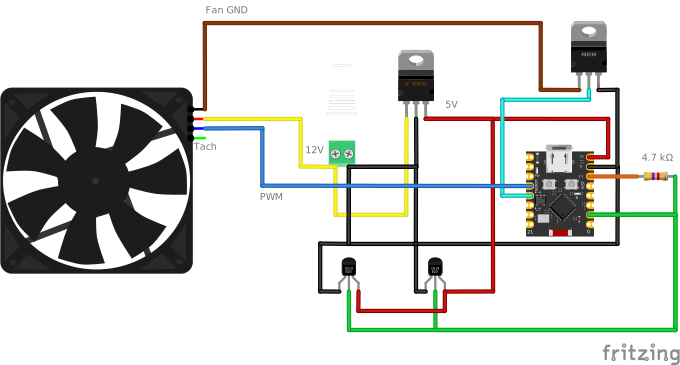
Ideally, the entire system is powered by only one 12V source that can feed the fans, as well as the ESP32. The 5V regulator steps the voltage down for the ESP32. The power supply will need to support all fans. However, if the fans are operated at a fraction of their maximum performance, the power supply can be undersized.
Two DS18B20 temperature probes are used for flow and return lines. These need to be attached to the respective pipes with wire straps or similar.
The NPN transistor is used to turn the fans off completely, as this cannot be achieved through the PWM signal. It needs to be capable to handle the electrical current and should be able to work with the ESP32. I have used a TIP102, though that may be oversized.
The fans can be daisy-chained, incl. the PWM wire, which can be connected to the ESP32 directly.
Everything should fit onto a small soldering board and can be glued to the frame underneath the radiator.
The fans can be put onto a 3D printed frame. There are various models with different sizes on Thingiverse, such as this one.
Magnets are needed to hold the frame in place. In addition, I have used anti-vibration rubber fan mounts to hold the fans on the frame.
In the end, everything should nicely fit into the bottom of radiator and should be invisible (apart from the power adapter), guaranteeing a high WAF.
Wiring:
Should be pretty straightforward.
Only thing to be aware of is to not daisy-chain the tachometer signal from the fans, as these will all be different.
ESPHome:
The ESP must be ESPHome-controlled. The home page explains the multiple ways this can be achieved.
Config File:
The YAML file configures:
- variables that hold heating and cooling threshold temperatures. When these are exceeded the fans will be turned on/off.
- variables that hold the PWM values = speed of the fans
- variable that controls the mode. This is used to "switch" between the thresholds for heating and cooling, so that the fans do not turn on in the winter, once the temperature falls below the cooling threshold (and vice versa in the summer).
- an MQTT component that exposes the variables. Read/write using topic/state or topic/command.
- one or more WiFi networks to connect to.
ESP YAML Setup:
Adjust the settings in the "substitutions" section of the YAML file and create a "secrets" file with the necessary passwords.
The DS18B20 addresses need to be discovered. This can be achieved by temporarily using an empty 1-Wire YAML configuration in DEBUG mode. The address(es) of the 1-Wire sensors will then be shown in the debug log:
    substitutions:
      device_name: livingroomradiator  # Adjust!
      friendly_name: "Radiator Livingroom" # Adjust!
      one_wire_pin: 10 # 1-Wire pin for DS18B20 temperature. Adjust!
      # pwm_pin: 0 # PWM output to fans. Adjust!
      # pwm_freq: 25000  # higher values will decrease resolution, lower values will become audible
      # pwm_channel: 0
      # fan_enable_pin: 2 # turn fan on/off  # Adjust!
      # sensor_flow_temp: 0x0000000000000000  # Adjust!
      # sensor_return_temp: 0x0000000000000000  # Adjust!
      domain: .fritz.box # Adjust!
      # mqtt_broker: mqtt${domain} # Adjust!
      # mqtt_topic_prefix: 'radiator/${device_name}'
      log_level: DEBUG   # INFO DEBUG

    #define PWMRESOLUTION  8
    #define PWM_MAX_VAL    255 // 2^PWMRESOLUTION -1

    ############ SETUP ############
    esphome:
      name: ${device_name}
      friendly_name: ${friendly_name}
      min_version: 2025.9.0
      name_add_mac_suffix: false

    esp32:
      variant: esp32c3
      framework:
        type: esp-idf

    logger:
      level: ${log_level} # INFO  # Don't use DEBUG in production
      baud_rate: 0 #disable serial in order to use serial ports for modbus
      logs:
        # Reduce verbosity for components that might log sensitive data
        wifi: WARN
        api: WARN

    wifi:
      min_auth_mode: WPA2
      domain: ${domain}
      networks:
      - ssid: !secret wifi_ssid
        password: !secret wifi_password

    ota:
      - platform: esphome
        password: !secret eh_tesla_ota_password

    one_wire:
      - platform: gpio
        pin: ${one_wire_pin}
Once the sensor addresses are added to the YAML code it can be "Installed" (uploaded) to the ESP device. The temperature threshold and PWM values can be modified using MQTT (with topic/command). In addition, it is possible to monitor the flow and return temperatures. If these are very close together (less than 2-3 °C), then the radiator is not able to radiate enough heat and the throughput should likely be limited by using the valve.
Warm regards!
