

Nexus-MCP resolves "Tool Space Interference" in Large Language Models by aggregating multiple MCP servers into a single gateway. Utilizing a strictly deterministic 4-phase workflow—Discovery, Mapping, Schema Verification, and Bridged Execution—it prevents context saturation and tool hallucinations, enabling the use of massive tool ecosystems without sacrificing reasoning accuracy.
The integration of Gemini CLI and Google Antigravity with the Model Context Protocol (MCP) has significantly expanded the capabilities of LLM-based agents. However, this expansion introduces a critical performance bottleneck. As the number of available tools grows, Large Language Models (LLMs) suffer from a measurable decline in reasoning accuracy and tool-selection reliability.
Research identifies this phenomenon as "Tool Space Interference (TSI)." When an LLM's context window is saturated with excessive tool definitions, semantic overlap and irrelevant metadata distract the model Ref. Current technical guidelines suggest a "soft limit" of approximately 20 functions to maintain high accuracy. Exceeding this threshold often leads to increased hallucination rates and failures in executing complex instructions.
The standard MCP workflow operates by injecting all retrieved metadata (names, descriptions, JSON Schemas) directly into the context window. Nexus-MCP overcomes the scalability limits of this architecture by acting as an intelligent, unified gateway. Instead of exposing the entire toolset to the LLM—which triggers TSI—Nexus-MCP aggregates multiple MCP servers and employs a routing layer. This modular approach preserves model performance by minimizing noise and optimizing information density. The approach described in this article should be understood as one of several strategies for mitigating TSI.
https://github.com/tanaikech/nexus-mcp-extension
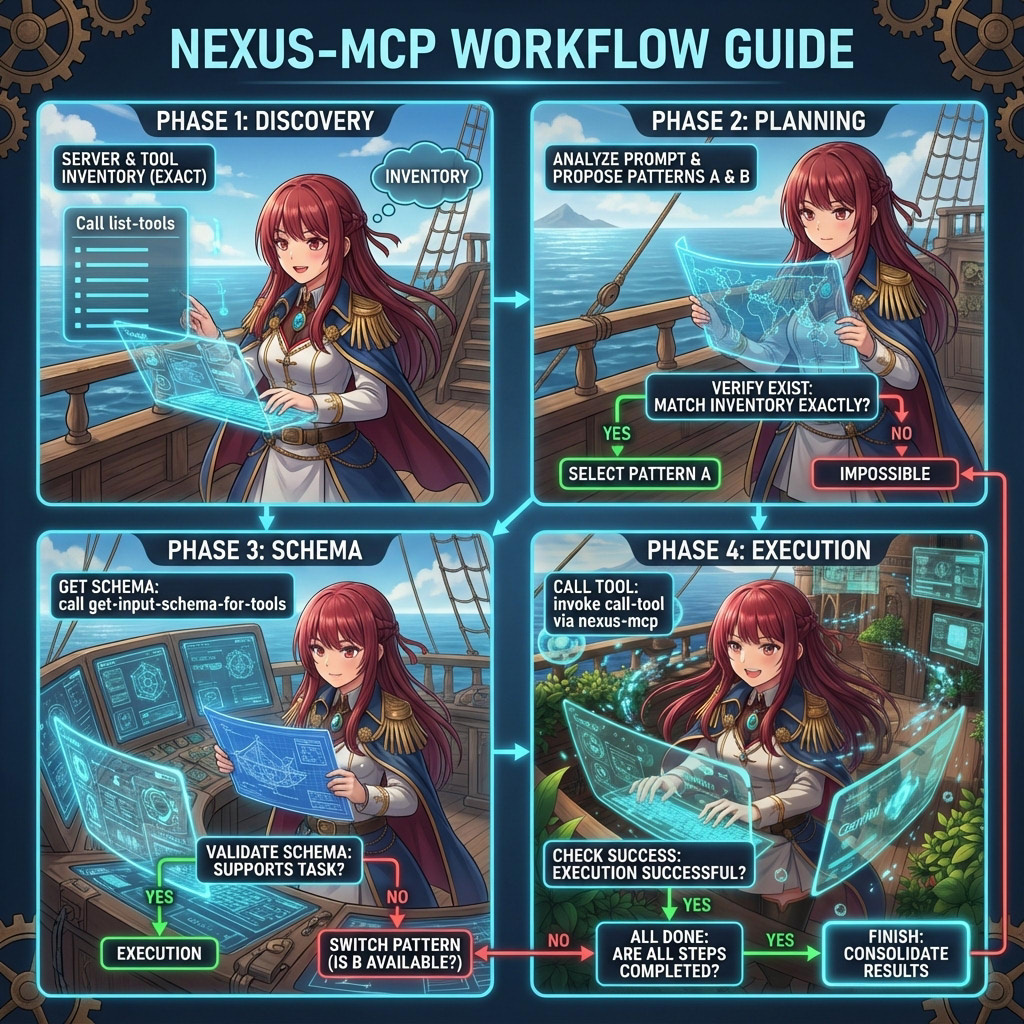
Nexus-MCP operates as a meta-server, utilizing StdioClientTransport to manage dynamic connections to downstream servers defined in a JSON configuration. It exposes four specialized core tools that enforce a "Defensive and Deterministic" workflow:
1. Aggregated Discovery (list-tools)
Unlike standard discovery, this tool aggregates inventories from all connected servers into a single formatted list. Crucially, it injects "Search Hints" directly into the output. These hints guide the LLM to identify non-obvious tools for complex tasks—such as finding "PDF generation" via MIME types or locating "GAS" (Google Apps Script) capabilities—without requiring the model to guess tool names.
2. Server Introspection (get-server-information)
This tool provides high-level metadata about the connected ecosystem, allowing the agent to verify which server versions and tool sets are currently active before attempting any operations.
3. Surgical Schema Retrieval (get-input-schema-for-tools)
To prevent context saturation, Nexus-MCP does not broadcast input schemas by default. Instead, the agent must explicitly request the schema for a specific server_name and tool_name. This asynchronous retrieval ensures that only relevant technical constraints are loaded into the LLM's context.
4. Bridged Execution (call-tool)
Execution is strictly routed. The agent must provide the exact server_name and tool_name (validated against the discovery list). Nexus-MCP acts as a proxy, forwarding the request to the appropriate downstream server and returning the result to the agent.
To eliminate hallucinations, the system instructions enforce the following loop:
- Direct Discovery: Call
list-toolsto build a literal registry of valid[SERVER_ID]and[TOOL_ID]pairs. - Literal Mapping: Analyze the prompt against the registry. If a requested capability is missing, the task is flagged as impossible immediately.
- Schema Verification: Retrieve schemas only for the selected tools to validate parameters.
- Bridged Execution: Execute the tools sequentially via the gateway.
This guide uses Gemini CLI and Google Antigravity to demonstrate the capabilities of Nexus-MCP.
Install Gemini CLI
First, install the Gemini CLI via npm:
npm install -g @google/gemini-cliAuthorize the CLI by following the instructions in the official documentation.
Install Google Antigravity
Please refer to the official release and installation guide at https://antigravity.google/.
Install the Nexus-MCP extension directly via the Gemini CLI:
gemini extensions install https://github.com/tanaikech/nexus-mcp-extensionTo demonstrate aggregation, we will install two specific extensions: Google Workspace and ToolsForMCPServer.
Important Note: We will install these extensions to download their source code and authenticate them. However, they must be disabled in the Gemini CLI after testing. This ensures that Nexus-MCP manages them exclusively, preventing duplicate tool definitions in the LLM context.
A. Google Workspace Extension
- Install the extension:
gemini extensions install https://github.com/gemini-cli-extensions/workspace- Launch the Gemini CLI to trigger the automatic authorization flow.
- Run the following prompt in Gemini CLI to ensure it works:
Get the current date and time.
- Once verified, disable the extension:
gemini extensions disable google-workspaceB. ToolsForMCPServer Extension
- Install ToolsForMCPServer-extension. Refer to the installation guide for details.
- Launch Gemini CLI and run the verification prompt:
Get the current date and time.
- Once verified, disable the extension:
gemini extensions disable tools-for-mcp-server-extensionTo aggregate these disabled extensions under Nexus-MCP, you must create a configuration file.
Create mcp_config.json
Identify the installation paths of your extensions using gemini extensions list. Typical paths are located in /home/{username}/.gemini/extensions/....
Create the JSON file (e.g., in your home directory) with the following content. Replace {username} with your actual username.
{
  "mcpServers": {
    "google-workspace": {
      "command": "node",
      "args": [
        "/home/{username}/.gemini/extensions/google-workspace/dist/index.js"
      ]
    },
    "tools-for-mcp-server-extension": {
      "command": "node",
      "args": [
        "/home/{username}/.gemini/extensions/tools-for-mcp-server-extension/mcp-server/src/tools-for-mcp-server-extension.js"
      ],
      "timeout": 300000
    }
  }
}
Set Environment Variable
This environment variable is used for both Gemini CLI and Antigravity.
Point Nexus-MCP to this configuration file. Replace {your path} with the full path to the file you just created.
export MCP_SERVER_LIST="{your path}/mcp_config.json"Verify Configuration
Run gemini extensions list. You should see nexus-mcp-extension enabled, while the other two are disabled (marked with ✗).
$ gemini extensions list
✗ google-workspace (v0.0.3)
 ...
 Enabled (User): false
 ...
✓ nexus-mcp-extension (0.0.1)
 ...
 Enabled (User): true
 ...
✗ tools-for-mcp-server-extension (1.2.0)
 ...
 Enabled (User): false
 ...
Launch the Gemini CLI. You can confirm the connection status by running the /mcp command.
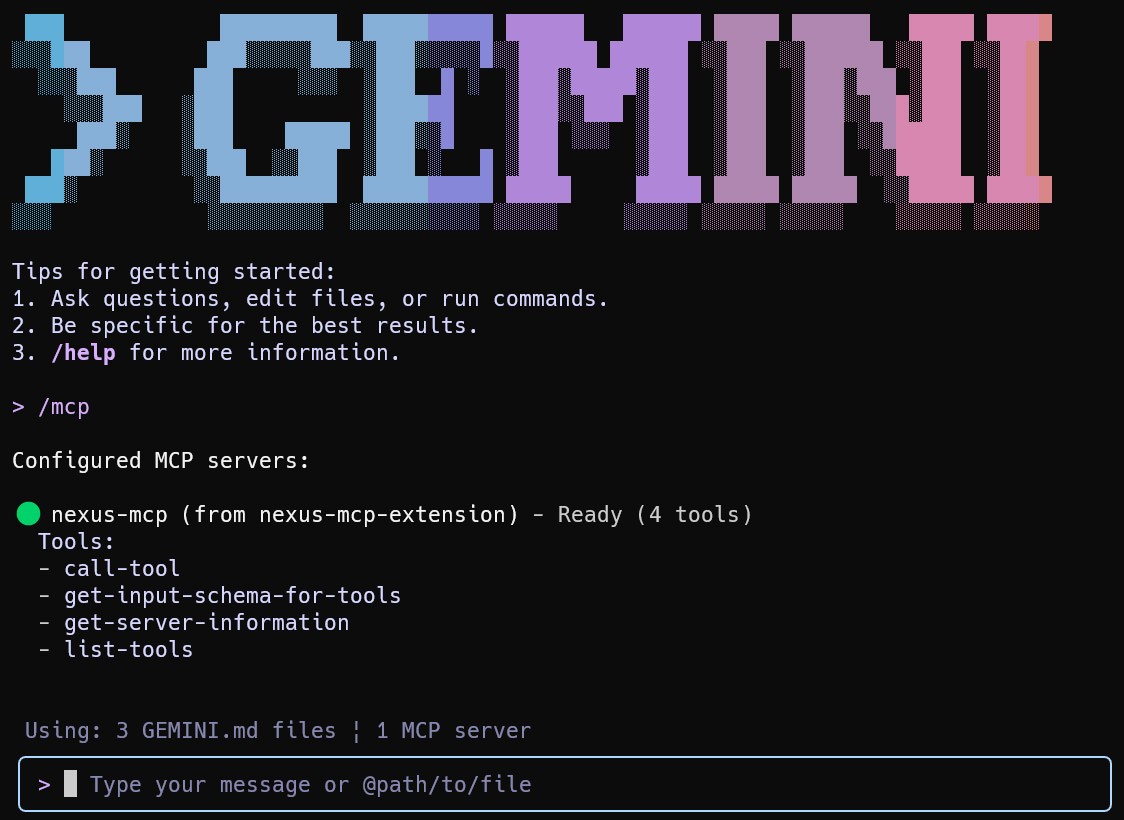
To verify which tools Nexus-MCP has aggregated, use the prompt: run a tool get-server-information.

In this example, the system successfully identifies 46 tools from google-workspace and 160 tools from tools-for-mcp-server-extension. In this sample case, the total number of tools is 206.
Case Study 1: Weather Information
Prompt:
What is the weather forecast for Tokyo at noon today?
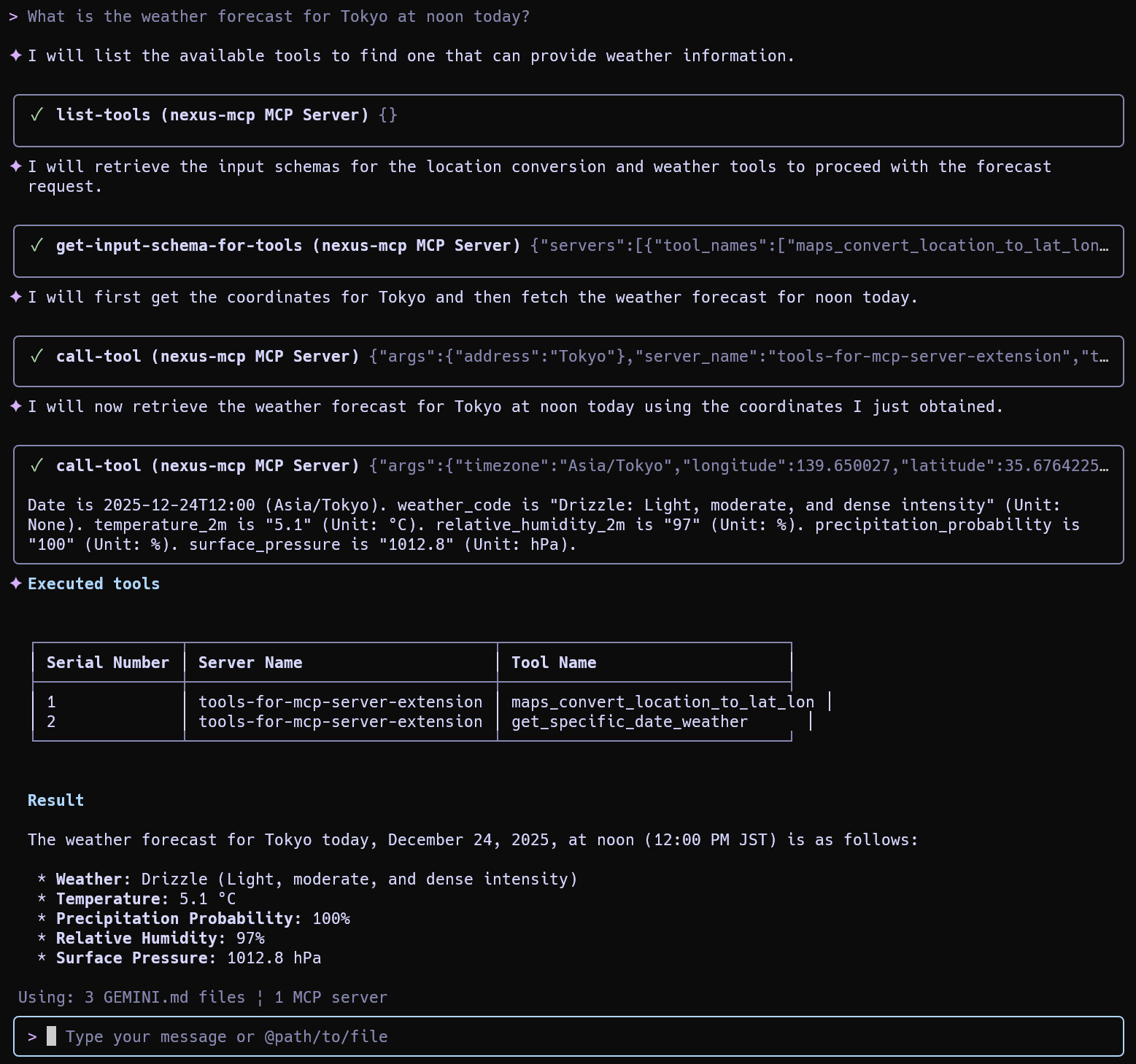
Result: The agent identifies and utilizes 2 specific tools from tools-for-mcp-server-extension to fulfill the request.
Case Study 2: Calendar Management (Routing Control)
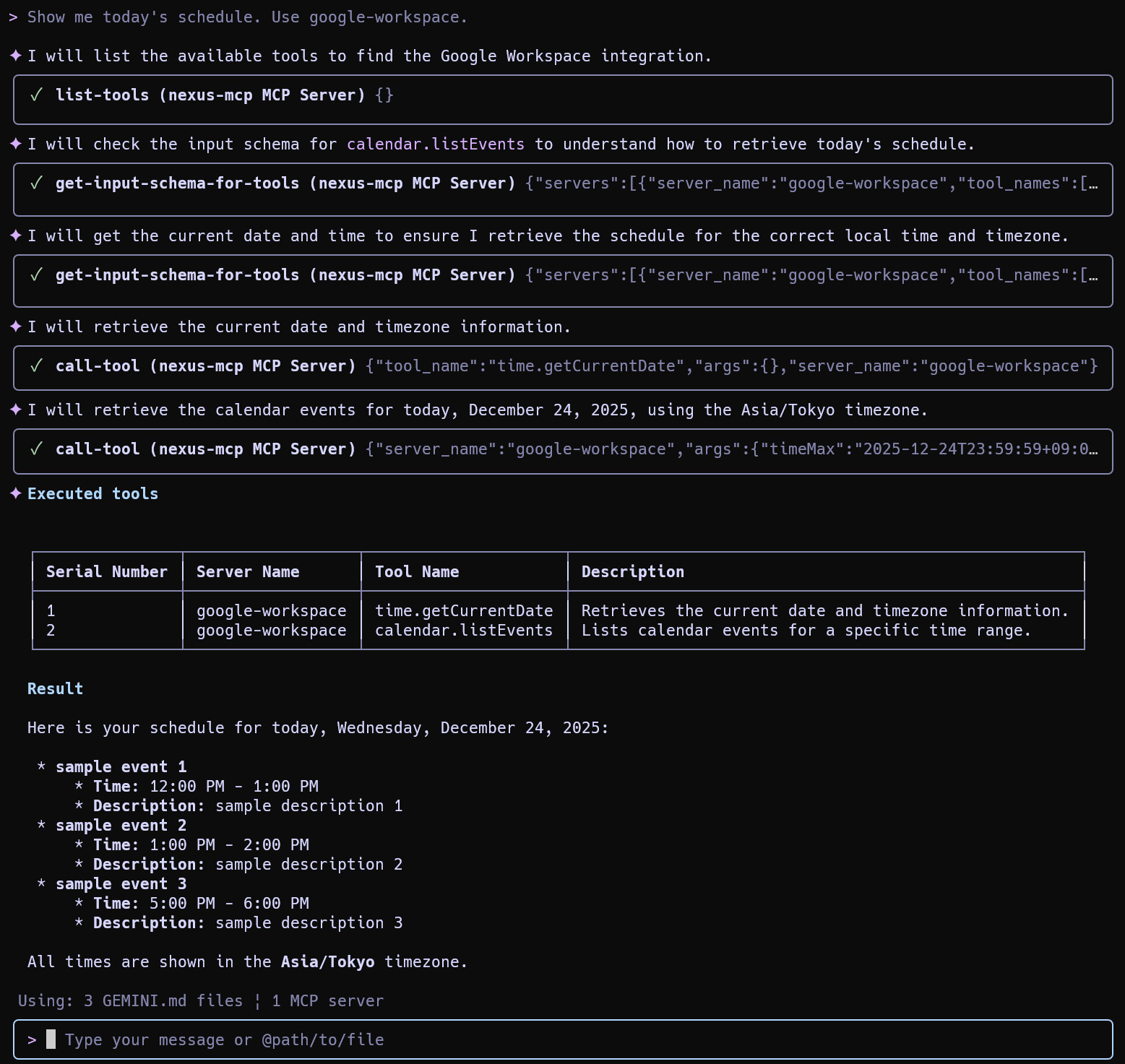
Since Google Calendar functionality exists in both extensions, you can direct the agent to use a specific backend by specifying the server name.
Option A: Using Google Workspace
Show me today's schedule. Use google-workspace.
Option B: Using ToolsForMCPServer
Show me today's schedule. Use tools-for-mcp-server-extension.

Case Study 3: Complex Multi-Tool Workflows
Nexus-MCP truly shines when handling complex instructions that require tools from multiple sources.
Prompt:
Write a comprehensive article about developing Google Apps Script (GAS) using generative AI. The article should include an introductory overview, formatted lists for best practices, and a table comparing different AI-assisted coding techniques. Once generated, please create a new Google Document, insert the content, and provide the shareable URL.
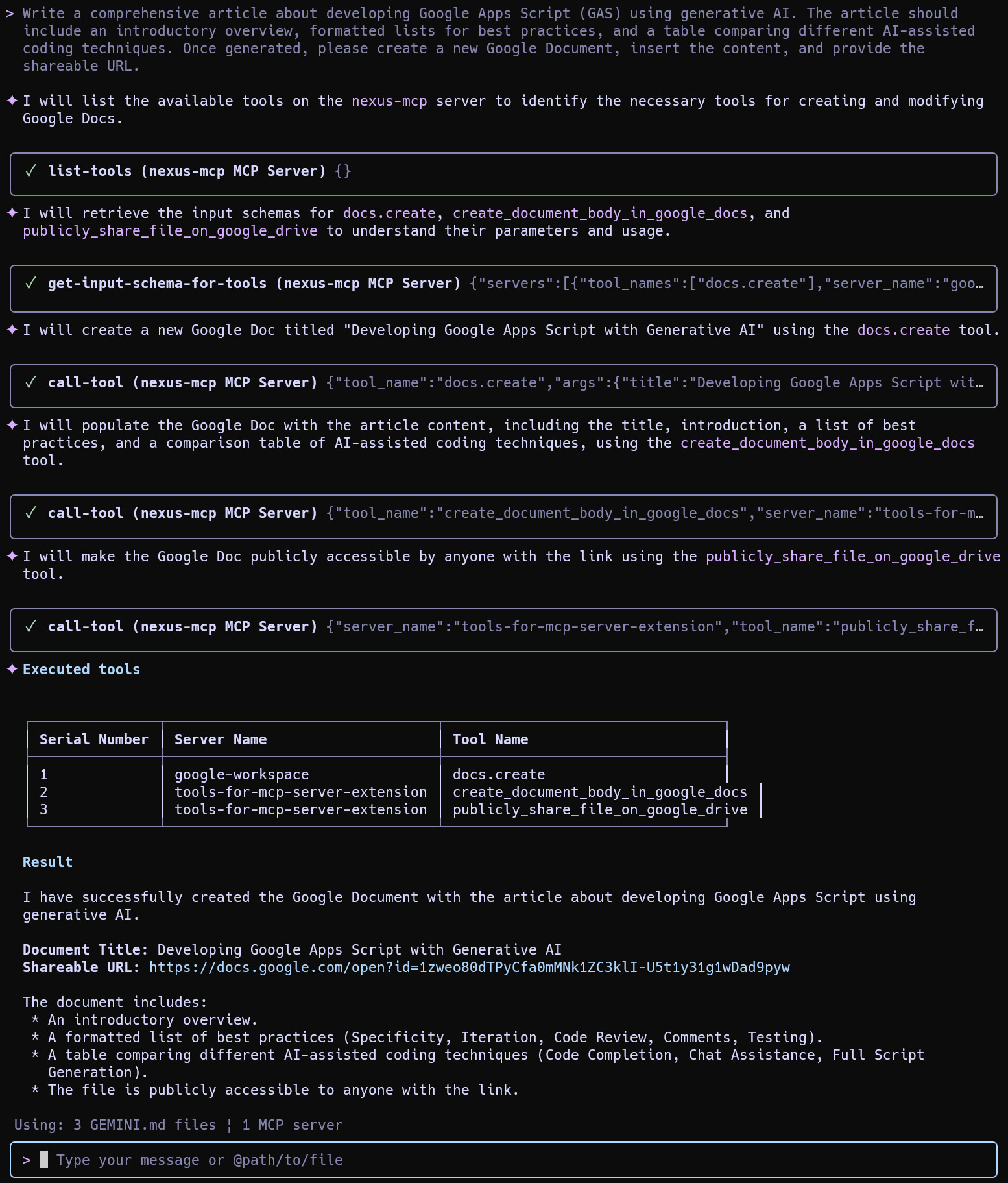
Result: The agent coordinated 3 different tools across both aggregated servers to generate the content and create the document.
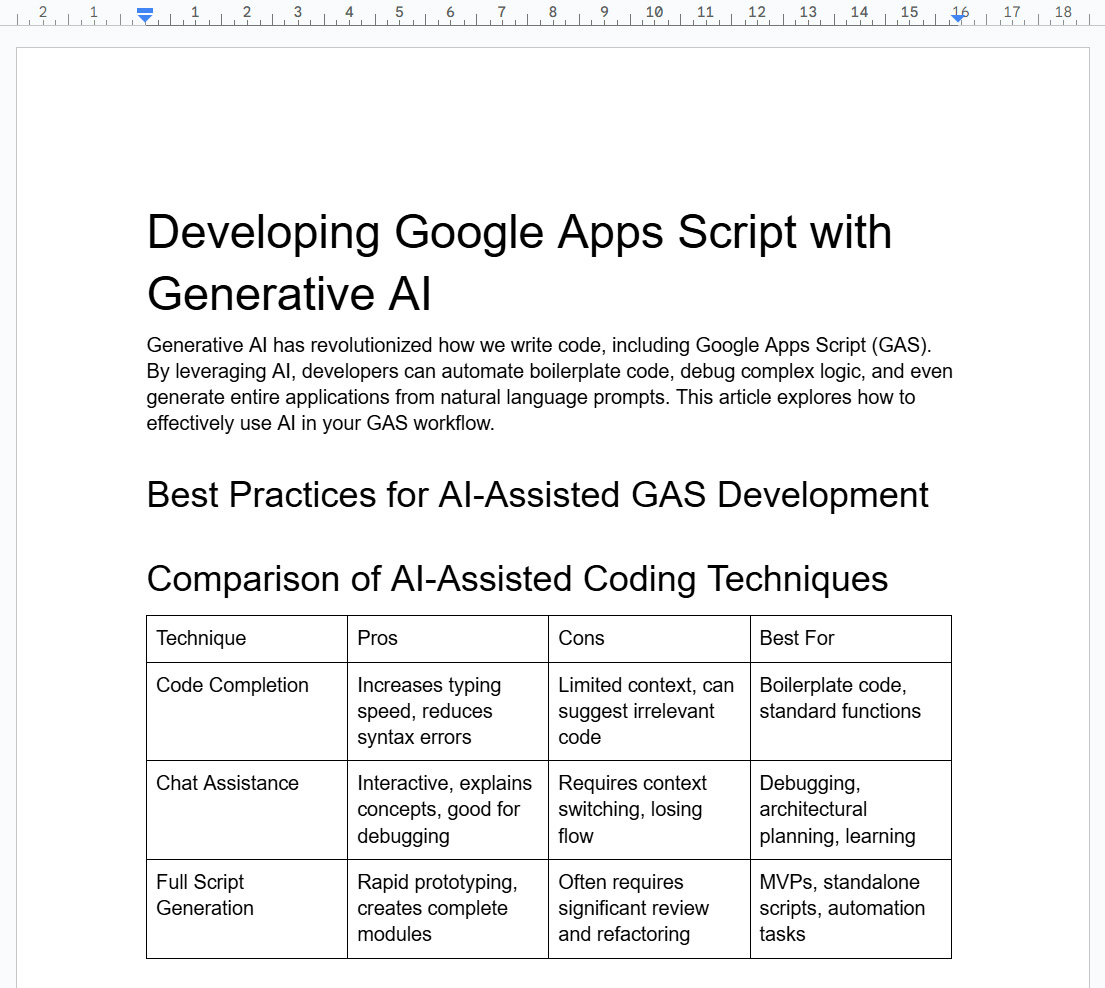
Nexus-MCP can also be integrated into Google Antigravity for advanced agentic workflows. In this article, the MCP servers installed as the Gemini CLI Extensions are used.
1. Set Rules
Launch Antigravity. Click the three dots (top right) and select Customizations. In the Rules section, paste the content of the GEMINI.md file included with the extension. This step is crucial as it loads the system instructions that enforce the 4-Phase Algorithm (Discovery, Mapping, Schema, Execution).
Command to read the file:
cat /home/{username}/.gemini/extensions/nexus-mcp-extension/GEMINI.md2. Configure MCP Server
Click the three dots (top right) > MCP servers > Manage MCP servers. Select View raw config. Paste the following configuration (replace {username} with yours):
{
  "mcpServers": {
    "nexus-mcp": {
      "command": "node",
      "args": [
        "/home/{username}/.gemini/extensions/nexus-mcp-extension/mcp-server/src/nexus-mcp.js"
      ]
    }
  }
}
Click Refresh. You should see the connected Nexus-MCP server.
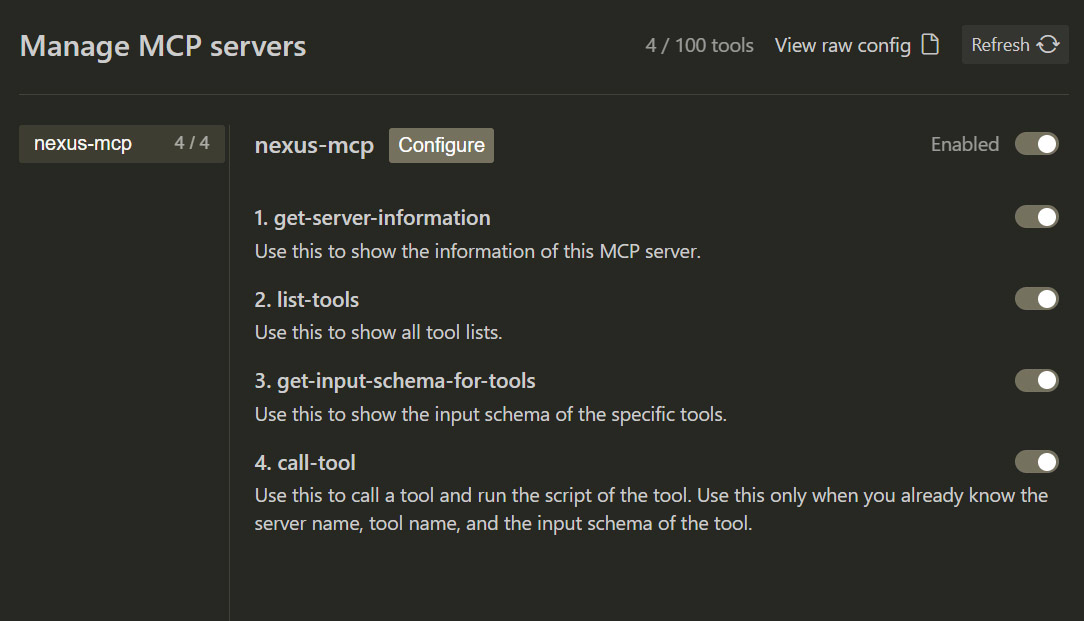
Case Study 1: Weather Information
Prompt:
What is the weather forecast for Tokyo at noon today?
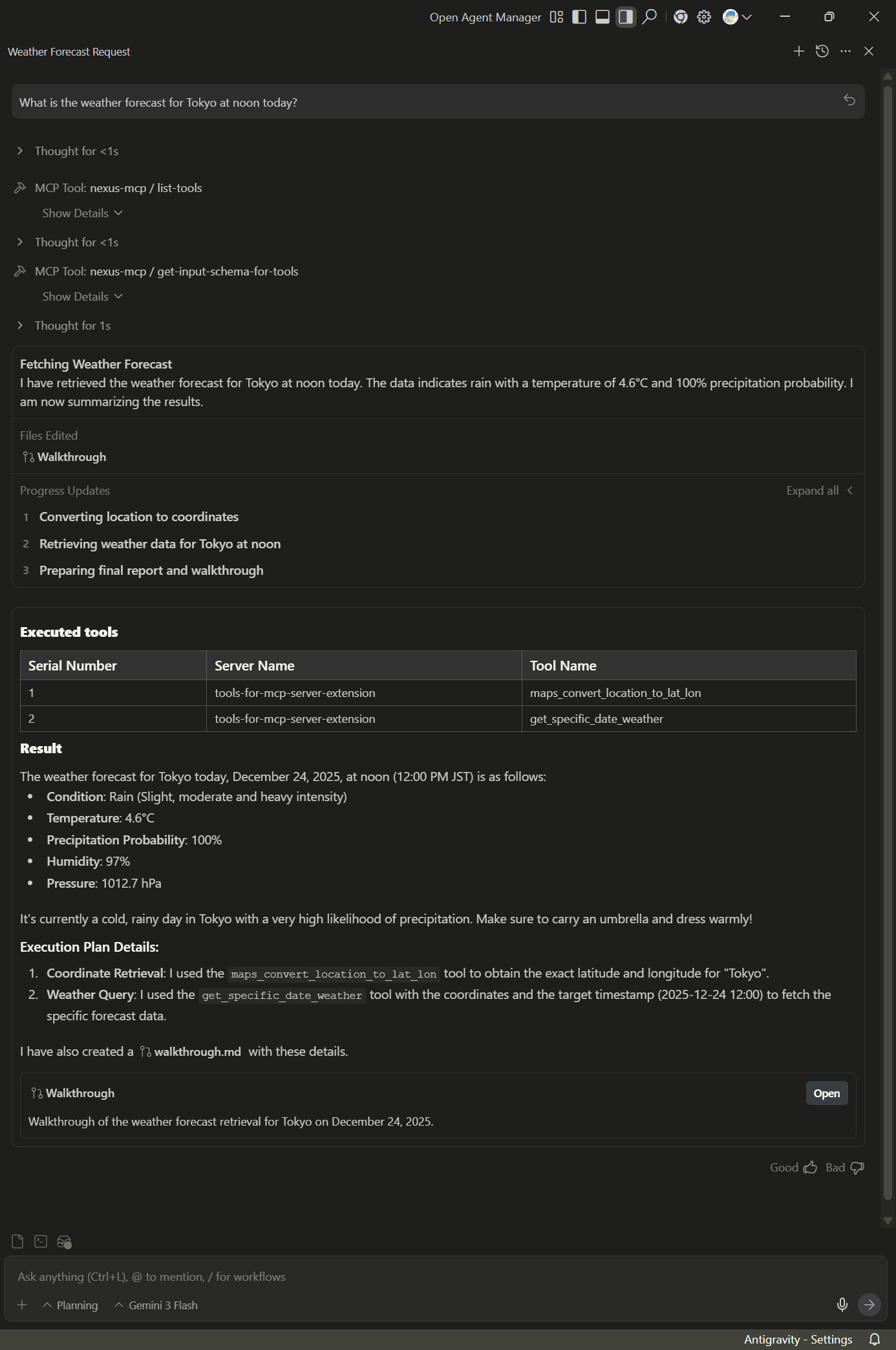
Walkthrough: The agent correctly identifies the weather tool and processes the request.

Case Study 2: Complex Workflow
Scenario: A multi-step task involving content generation, document creation, PDF conversion, and email delivery.
Prompt:
Write a comprehensive article about developing Google Apps Script (GAS) using generative AI. The article should include an introductory overview, formatted lists for best practices, and a table comparing different AI-assisted coding techniques. Once generated, please create a new Google Document, insert the content, convert the Google Document to a PDF file, and send an email to `tanaike@hotmail.com` including the shareable URL of the PDF file by giving a suitable title and email body.
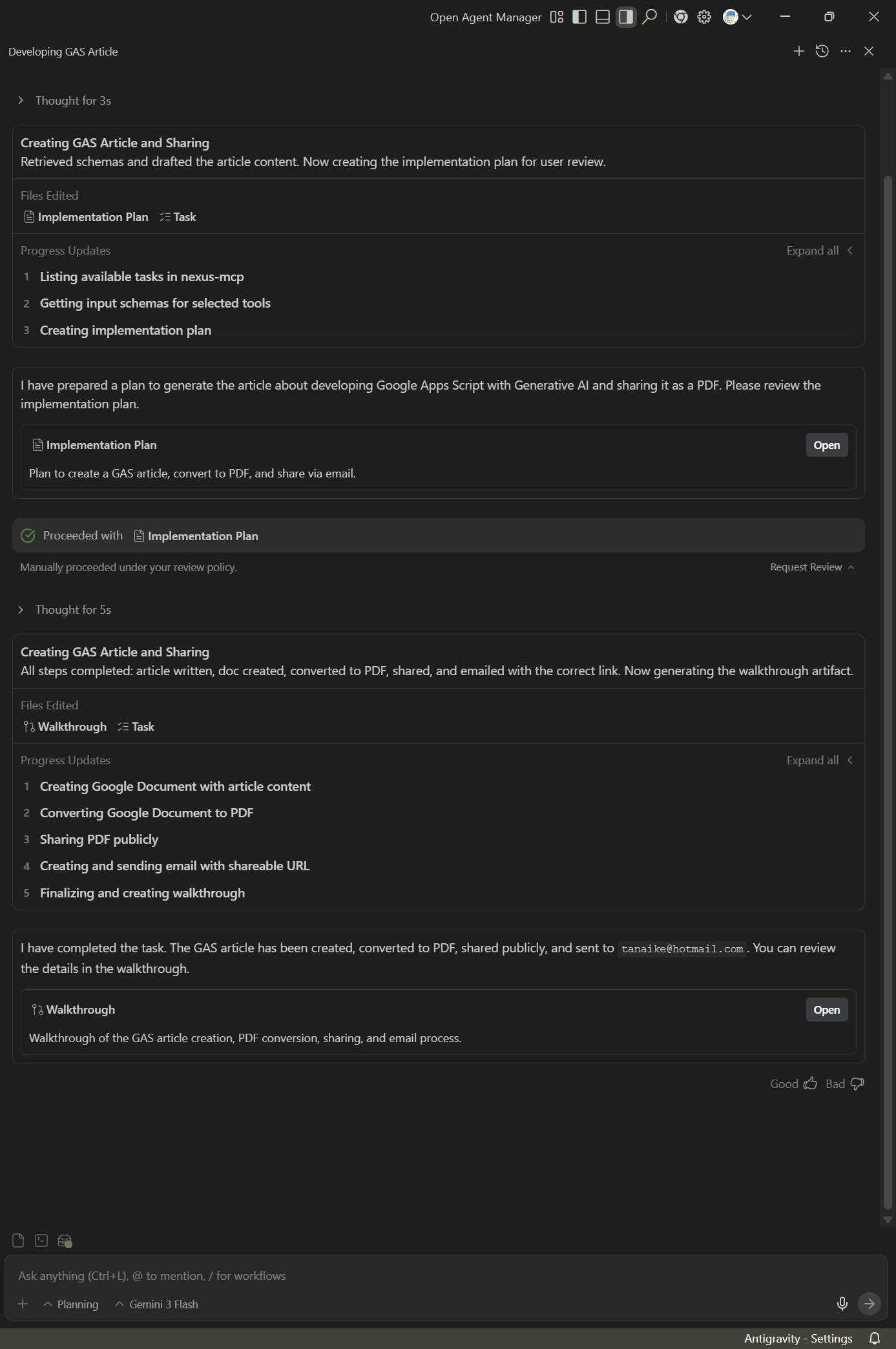
Implementation Plan: Antigravity analyzes the request and builds a step-by-step plan based on the keyword mapping rules (finding tools for PDF conversion and email).
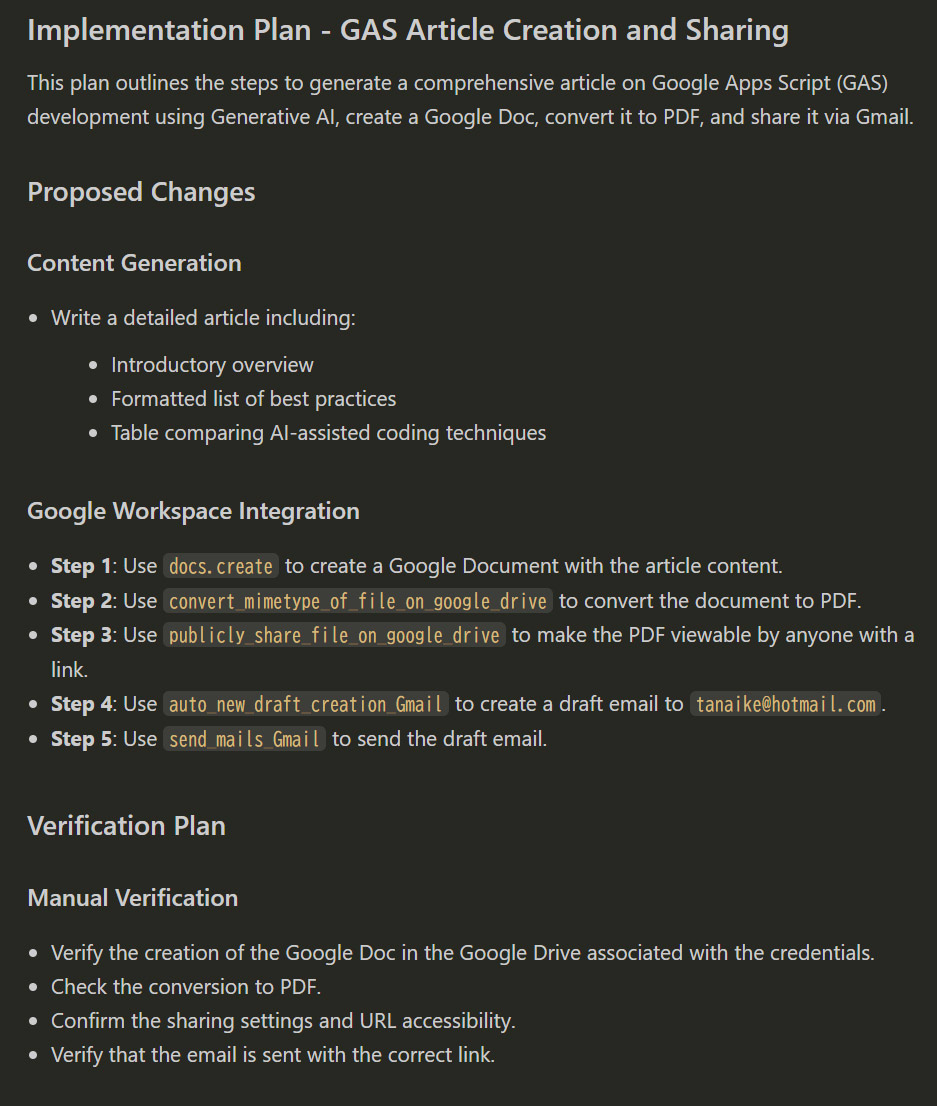
Walkthrough: The agent executes the plan sequentially.
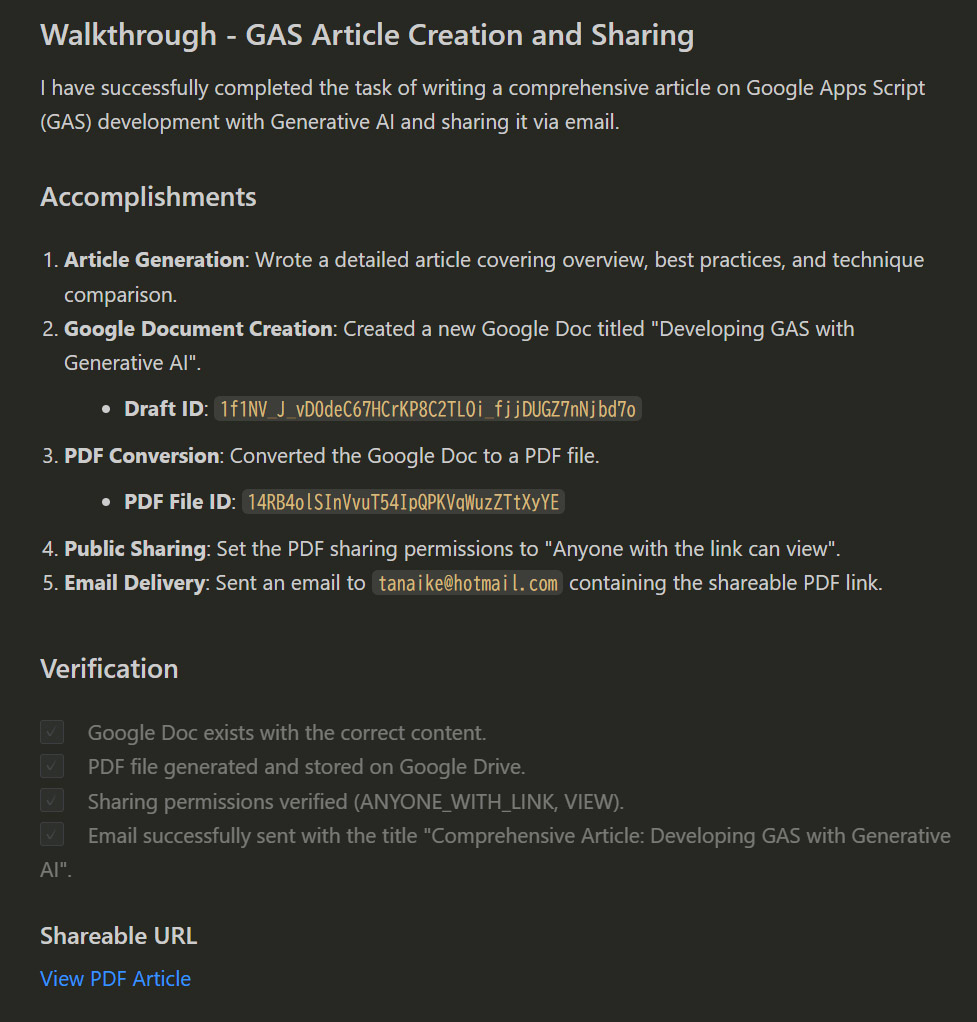
Outcome: The email was successfully received with the correct metadata and attachment link.
# Title
Comprehensive Article: Developing GAS with Generative AI

# Body
Hello,

I have completed the article on developing Google Apps Script (GAS)
using Generative AI.
...
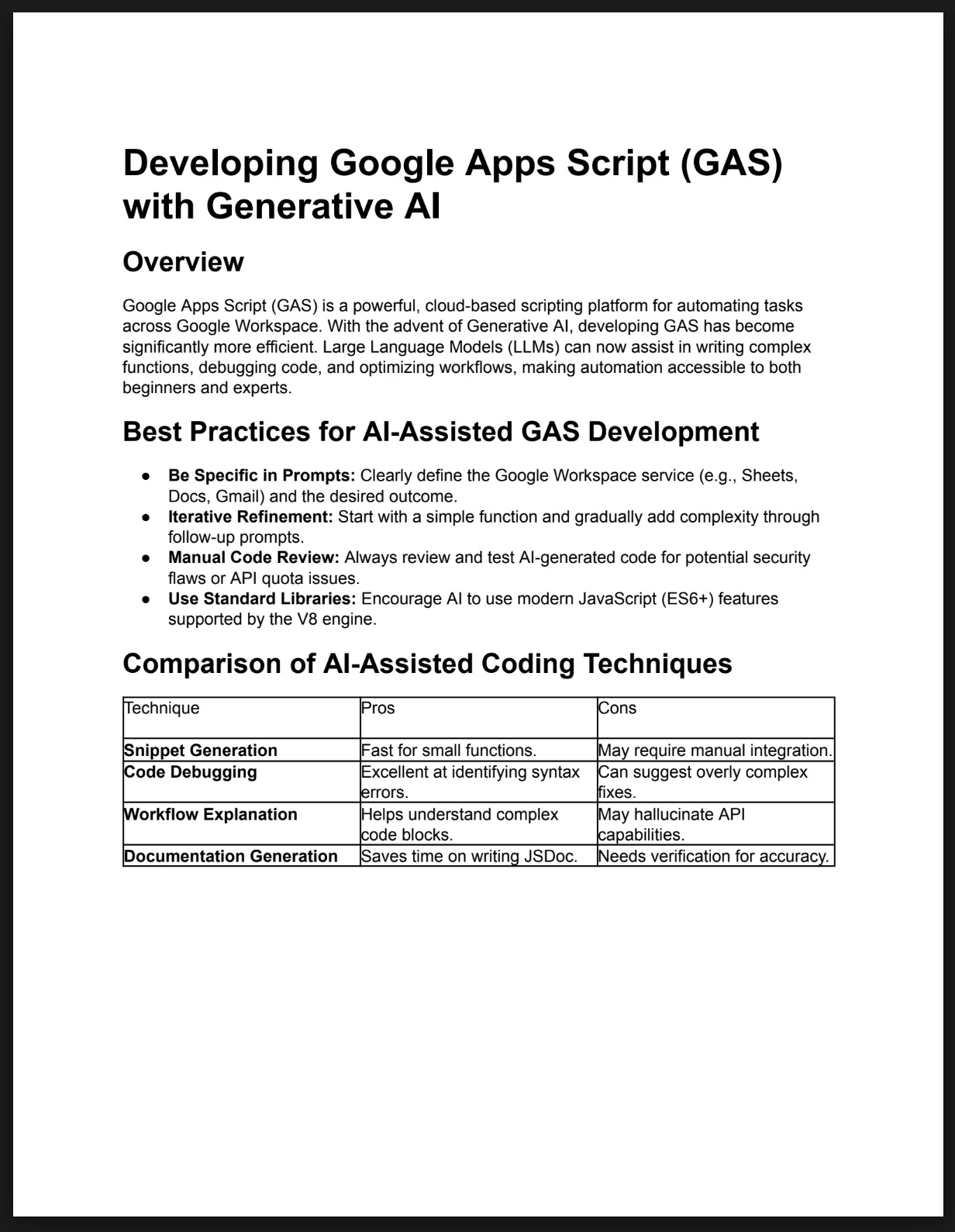
The generated PDF confirms the content integrity.
Performance can vary between model versions (e.g., gemini-3-pro vs. gemini-3-flash). In testing, the Gemini CLI occasionally reached the goal more reliably than Antigravity depending on the specific model used. If you encounter issues where the agent fails to reach the goal in Antigravity, try updating the system instruction (Rules) or refining the prompt to align more closely with the strategic keyword mapping defined in the system architecture.
Nexus-MCP represents a significant advancement in managing large-scale tool ecosystems for LLMs. By abstracting the complexity of multiple servers behind a single gateway, it ensures that agents remain accurate and efficient even as their capabilities grow.
- Solves Tool Space Interference (TSI): Effectively prevents context window saturation and reduces model confusion by dynamically filtering irrelevant tool definitions.
- Unified Gateway Architecture: Simplifies client configuration by aggregating multiple disparate MCP servers into a single access point.
- Defensive & Deterministic Logic: Employs a mandatory 4-phase algorithm (Discovery, Mapping, Schema, Execution) to enforce strict literal matching and eliminate tool hallucinations.
- Cross-Platform Integration: Provides seamless compatibility with major agentic platforms like Gemini CLI and Google Antigravity.
- Complex Workflow Orchestration: Enables the coordination of sophisticated multi-step tasks (e.g., Doc -> PDF -> Email) across different providers with high reliability.
- Tool Space Interference Research: Microsoft Research Blog
- Nexus-MCP Extension: GitHub Repository
- ToolsForMCPServer Extension: GitHub Repository
- Google Workspace Extension: GitHub Repository
- Gemini CLI: Official Documentation
- Google Antigravity: Official Site