
ℹ️ Last Updated: December 24 2025 by scramblr. Originally put together by UP-N-ATOM who can be found here: up-n-atom's github
ℹ️ The vulnerability & hacking method was originally discussed and confirmed with the help of https://discord.pon.wiki
ℹ️ A document Changelog has been established and can be found at the bottom of this document.
This Device Jailbreak Is Accomplished via Rooting The Device with a PRIVILEGE ESCALATION Exploit Found in DHCP.
The AN5500 is manufactured by Gemtek Technology Co. and deployed by Lumen/Quantum/CenturyLink for use on their PON network. This is a fancy way of saying it's a fiber optic modem for Lumen's ISP Customers. Regardless what you call it, this paper provides step by step instructions on hacking in, and taking over the device through a fairly old DHCP vulnerability that was discovered during the shellshock days.
FCC ID & Testing Documentation via FCCID.IO
The firmware for these devices can easily be extracted and explored using binwalk and pretty much any Linux Distro that exists, and that includes Bieber Linux! Chances are, while you're trying to install binwalk or more specifically sasquatch (a requirement for binwalk) you'll run in to errors during the build. Since the thing having problems and errors is massively important (lzma and squash-fs extractors) you'll want to fix it using the instructions below. Or don't. I'm not your parent. The level of effort needed to hack this device with the instructions provided is TRIVIAL/FAIRLY EASY. So what are you waiting for?!
One of the most important tools you'll be using during this is BINWALK in order to take the firmware .bin files apart. The firmware is lovingly provided by CenturyLink/Lumen.
-
Grab binwalk here:
binwalk.git clone https://github.com/ReFirmLabs/binwalk -
Get Squash-fs sasquatch here:
sasquatchgit clone https://github.com/devttys0/sasquatch -
Install pre-reqs:
sudo apt-get intall build-essentials zlib1g-dev liblzma-dev liblzo2-dev -
Attempt sasquatch's
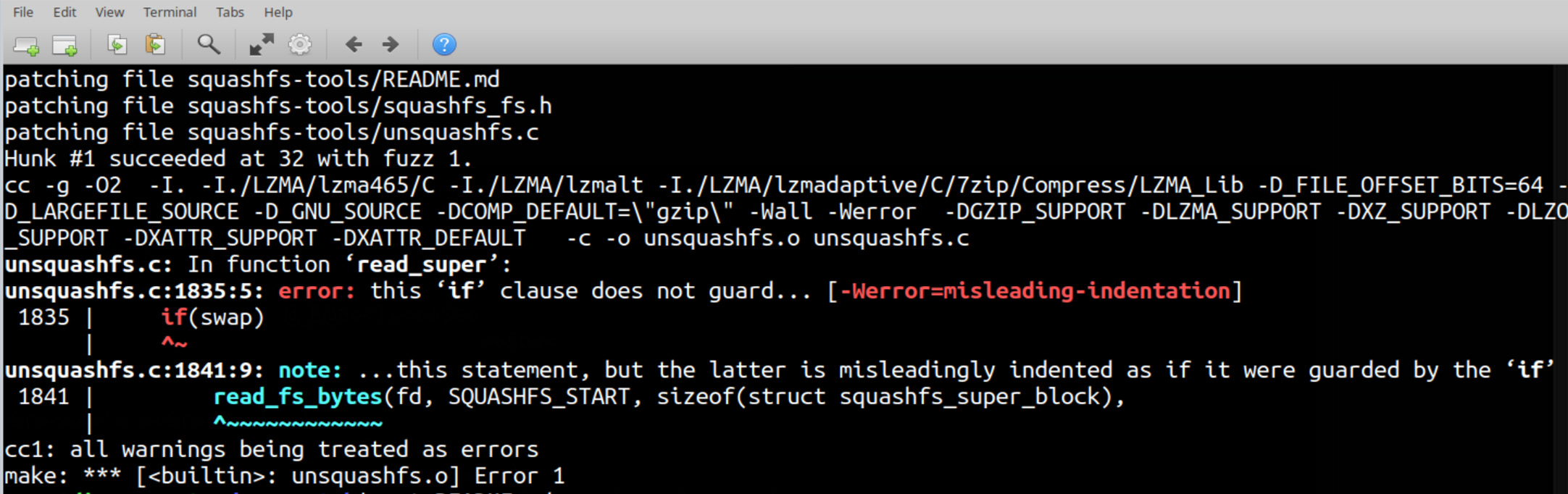
build.sh. If it doesn't work, grab the patch (instructions below the screenshot)Above is what the failures generally will look like.
-
If you get these errors (-Werror=misleading-indentation) like seen in the screenshot above, take a small detour and patch your installer.
-
sasquatch patch for build.shwget https://raw.githubusercontent.com/devttys0/sasquatch/82da12efe97a37ddcd33dba53933bc96db4d7c69/patches/patch0.txt -
"Apply" the patch by moving the patch0.txt file into sasquatch's build directory, inside of the already waiting folder named 'patches' (it's almost like they should just commit the patch!)
mv patch0.txt sasquatch/patchescd sasquatch && ./build.sh🗒️ If you're interested in more details about this patch, you can read about it here:
sasquatch build.sh fixes
- Go back into binwalk's folder and re-run build.sh.
binwalkcd binwalk && ./build.sh
Now that sasquatch is built and installed, binwalk will finish it's installer successfully (but might also have a few warnings that you'll also ignore!)
The latest firmware can be acquired from CenturyLink and Archive.org for when CenturyLink eventually tries to get rid of them from the public. As of writing this, there's at least three firmware versions. You can see which version you're running on the Modem Status Page of your device's admin panel. The firmware version is exactly the same in the file, so it's pretty easy to figure out.
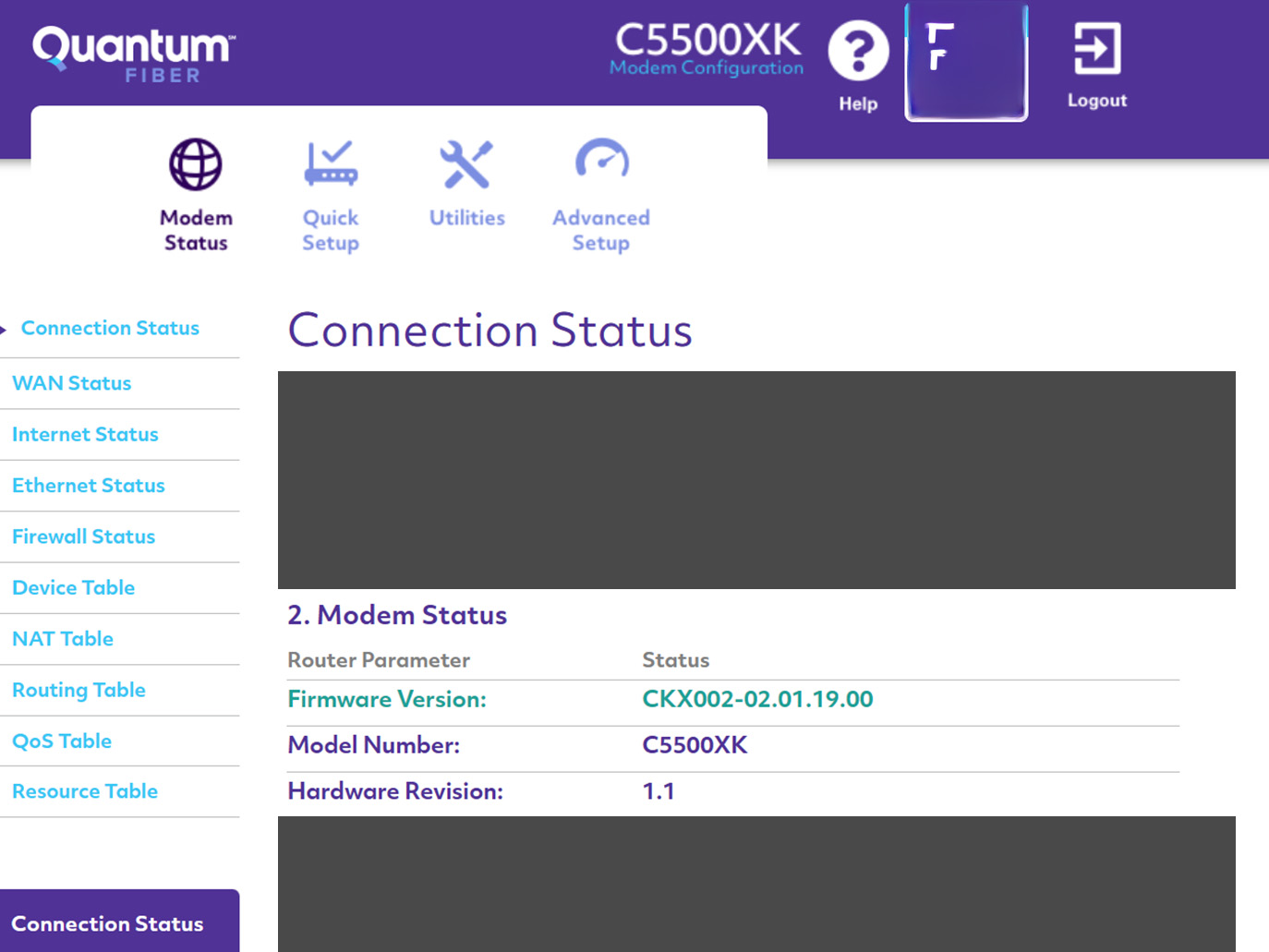
This website used to contain direct links to the firmware, but, CenturyLink.
https://www.centurylink.com/home/help/internet/modems-and-routers/c5500xk.html
Luckily the files are still located in the same directory structure. Here's all three known firmware versions. Feel free to add more, if you know of any.
CenturyLink Download: http://internethelp.centurylink.com/internethelp/modems/C5500XK/firmware/CKX001-02.00.13.00.bin
Archive.org Mirror: https://web.archive.org/web/20250802073412/https://internethelp.centurylink.com/internethelp/modems/C5500XK/firmware/CKX001-02.00.13.00.bin
CenturyLink Download: http://internethelp.centurylink.com/internethelp/modems/C5500XK/firmware/CKX002-02.01.07.00.bin
Archive.org Mirror: https://web.archive.org/web/20240827122137/https://internethelp.centurylink.com/internethelp/modems/C5500XK/firmware/CKX002-02.01.07.00.bin
CenturyLink Download: http://internethelp.centurylink.com/internethelp/modems/C5500XK/firmware/CKX002-02.01.19.00.bin
Archive.org Mirror: https://web.archive.org/web/20250802073412/https://internethelp.centurylink.com/internethelp/modems/C5500XK/firmware/CKX002-02.01.19.00.bin
mkdir c500xk && cd $_
wget http://internethelp.centurylink.com/internethelp/modems/C5500XK/firmware/CKX001-02.00.13.00.bin
binwalk -e CKX001-02.00.13.00.binTTY serial access
Failsafe mode is active and an entrypoint into the system.
mount_root or rather /lib/libfstools.so has been modified to cleanse the /overlay of directories and files not whitelisted within /etc/overlay_whitelist.conf thus preventing nonobtuse root access.
The serial console ttyS0 is not the standard getty, it's locked down to /usr/bin/avec_console within /etc/inittab.
A limited chroot environment is exposed over SSH with the environment being generated by /etc/init.d/chroot and started by /opt/econet/etc/dropbear init scripts.
With the typical edits being infeasible, we look towards what has been handed to us.
- Failsafe allows us access to the squashfs and the subsequent overlayfs, albeit whitelisted.
- We could trouble ourselves to disassemble
avec_consolelooking for a signs of a backdoor. - Lets not even bother with the chroot SSH but take note of
dropbear's presence.
Choosing the path of least resistance, we opt for #1. The whitelist leaves a lot to discovery but the one file that stands out is /etc/config/dhcp. Those in the know, know that DHCP services have a bestowed privilege of executing shell scripts and dnsmasq is no exception; the dhcpscript option spells it out, so lets abuse that privilege.
But before we do that, there are two caveats... First, from the manpage: "<path> must be an absolute pathname, no PATH search occurs". Second and most important, it must be a file that has been whitelisted.
Nearly all the whitelisted files are configuration files, with the exception of a handful... For the brevity of this guide, /etc/urandom.seed is the least necessary to the system functionality and anything within, is seeded as binary, but more importantly, seeding takes place after network bringup — i.e. /etc/rc.d/S19dnsmasq before /etc/rc.d/S99urandom_seed.
- Break into failsafe mode on bootup and mount the overlayfs
mount_root- Modify the lease script in
/etc/config/dhcp
uci set dhcp.dnsmasq_lan.dhcpscript="/etc/urandom.seed"
uci commit dhcp- Generate the trojaned lease script
/etc/urandom.seed
cat > /etc/urandom.seed << 'EOF'
#!/bin/sh

SCRIPT="/usr/lib/dnsmasq/dhcp_notify_event.sh"

[ -e /var/run/jailbreak.pid ] || (dropbear -P /var/run/jailbreak.pid -E -p 2222 &>/dev/null; uci -q set dhcp.dnsmasq_lan.dhcpscript="$SCRIPT" && uci -q commit dhcp && /etc/init.d/dnsmasq reload &>/dev/null)

exec $SCRIPT $@
EOF- Modify the root password to something memorable and known
passwd- Reboot with a network cable attached to a remote PC and SSH in after boot — e.g.
ssh root@192.168.0.1:2222
rebootThe pppd daemon has been modified to accept an encrypted password file that is decrypted by /usr/lib/pppd/2.4.7/passwordfile.so.
The password file is generated by encrypting a plain-text password using the RSA algorithm and public key /etc/axon_ppp_public.pem — e.g. found in /lib/netifd/proto/ppp.sh
echo "$password" | openssl rsautl -out "$passwdfile" -pubin -inkey /etc/axon_ppp_public.pem -encryptThe private key can be extracted from /usr/lib/pppd/2.4.7/passwordfile.so using binwalk on a remote PC.
scp -O root@192.168.0.1:2222:/usr/lib/pppd/2.4.7/passwordfile.so ./
binwalk -D="private:der:mv '%e' axon_ppp_private.der" ./passwordfile.so
A default password file also exists, /etc/ppp/ctlcred, and can be decrypted with the acquired private key — e.g.
scp -O root@192.168.0.1:2222:/etc/ppp/ctlcred ./
openssl pkeyutl -in ./ctlcred -inkey ./axon_ppp_private.der -decryptHere's some specs you can now see because you're no longer blinded by the jail that these devices keep consumers inside of during CLI SSH sessions.
root@OpenWrt:/# cat /proc/cpuinfo
system type             : EcoNet EN7580 SOC
machine                 : Unknown
processor               : 0
cpu model               : MIPS interAptiv (multi) V2.12
BogoMIPS                : 852.78
wait instruction        : yes
microsecond timers      : yes
tlb_entries             : 32
extra interrupt vector  : yes
hardware watchpoint     : yes, count: 4, address/irw mask: [0x0ffc, 0x0ffc, 0x0ffb, 0x0ffb]
isa                     : mips1 mips2 mips32r1 mips32r2
ASEs implemented        : mips16 dsp dsp2 mt eva
shadow register sets    : 1
kscratch registers      : 3
package                 : 0
core                    : 0
VCED exceptions         : not available
VCEI exceptions         : not available
VPE                     : 0

processor               : 1
cpu model               : MIPS interAptiv (multi) V2.12
BogoMIPS                : 1150.97
wait instruction        : yes
microsecond timers      : yes
tlb_entries             : 32
extra interrupt vector  : yes
hardware watchpoint     : yes, count: 4, address/irw mask: [0x0ffc, 0x0ffc, 0x0ffb, 0x0ffb]
isa                     : mips1 mips2 mips32r1 mips32r2
ASEs implemented        : mips16 dsp dsp2 mt eva
shadow register sets    : 1
kscratch registers      : 3
package                 : 0
core                    : 0
VCED exceptions         : not available
VCEI exceptions         : not available
VPE                     : 1

processor               : 2
cpu model               : MIPS interAptiv (multi) V2.12
BogoMIPS                : 1145.24
wait instruction        : yes
microsecond timers      : yes
tlb_entries             : 32
extra interrupt vector  : yes
hardware watchpoint     : yes, count: 4, address/irw mask: [0x0ffc, 0x0ffc, 0x0ffb, 0x0ffb]
isa                     : mips1 mips2 mips32r1 mips32r2
ASEs implemented        : mips16 dsp dsp2 mt eva
shadow register sets    : 1
kscratch registers      : 3
package                 : 0
core                    : 1
VCED exceptions         : not available
VCEI exceptions         : not available
VPE                     : 0

processor               : 3
cpu model               : MIPS interAptiv (multi) V2.12
BogoMIPS                : 861.38
wait instruction        : yes
microsecond timers      : yes
tlb_entries             : 32
extra interrupt vector  : yes
hardware watchpoint     : yes, count: 4, address/irw mask: [0x0ffc, 0x0ffc, 0x0ffb, 0x0ffb]
isa                     : mips1 mips2 mips32r1 mips32r2
ASEs implemented        : mips16 dsp dsp2 mt eva
shadow register sets    : 1
kscratch registers      : 3
package                 : 0
core                    : 1
VCED exceptions         : not available
VCEI exceptions         : not available
VPE                     : 1
root@OpenWrt:/# cat /proc/meminfo
MemTotal:         426332 kB
MemFree:          138068 kB
MemAvailable:     160248 kB
Buffers:           15904 kB
Cached:            48152 kB
SwapCached:            0 kB
Active:            93156 kB
Inactive:          21988 kB
Active(anon):      52444 kB
Inactive(anon):     1552 kB
Active(file):      40712 kB
Inactive(file):    20436 kB
Unevictable:           0 kB
Mlocked:               0 kB
SwapTotal:             0 kB
SwapFree:              0 kB
Dirty:                 4 kB
Writeback:             0 kB
AnonPages:         51132 kB
Mapped:            30204 kB
Shmem:              2908 kB
Slab:             133332 kB
SReclaimable:       3984 kB
SUnreclaim:       129348 kB
KernelStack:        2416 kB
PageTables:          548 kB
NFS_Unstable:          0 kB
Bounce:                0 kB
WritebackTmp:          0 kB
CommitLimit:      213164 kB
Committed_AS:      64712 kB
VmallocTotal:    1048372 kB
VmallocUsed:           0 kB
VmallocChunk:          0 kB
root@OpenWrt:/# cat /proc/mtd
dev:    size   erasesize  name
mtd0: 00200000 00040000 "bootloader"
mtd1: 00200000 00040000 "dsd"
mtd2: 00275dd6 00040000 "kernel"
mtd3: 01570000 00040000 "rootfs"
mtd4: 04000000 00040000 "tclinux"
mtd5: 00275e83 00040000 "kernel_slave"
mtd6: 01590000 00040000 "rootfs_slave"
mtd7: 04000000 00040000 "tclinux_slave"
mtd8: 14000000 00040000 "system"
mtd9: 00200000 00040000 "uenv"
mtd10: 00180000 00040000 "art"
SCRAMBLR - December 24 2025
- Added 2 additional firmware versions, including the current release
- Added Archive.org links
- Added instructions for patching sasquatch and binwalk
- Added instructions for figuring things out yourself
- Clarified & Organized Markdown and document
- Added screenshots
UP-N-ATOM - March 16, 2024
- Initial Document Created