
This file is used for a bootstrapping for a new user that will join the Crocc or Drocc Openstack cluster.
It could be:
- A project creation
- A user adding into an existing project
Note
During the process Quotas and information will be asked.

A simple Packer + Vagrant VirtualBox install of Ubuntu live-server 22.04 (x86) using Cloud-Init, and documentation of my host desktop.
A fresh install of any supported LTS or the latest Ubuntu desktop version is good. I have tested this on ubuntu 18.04.6 running on an i5-4570 (4 core 3.20GHz) with 16GB of RAM, a nearly 10 year old computer. Get a dedicated machine, it need not be fancy or new.
Update and get setup with some tools + deps first:

| #!/bin/bash | |
| export version=v8.0.7 | |
| export os=linux | |
| export arch=amd64 | |
| ##################################### | |
| curl -O https://get.gravitational.com/teleport-$version-$os-$arch-bin.tar.gz | |
| tar -xzf teleport-$version-$os-$arch-bin.tar.gz |

| #!/bin/bash | |
| export version=v4.2.8 | |
| export os=linux | |
| export arch=amd64 | |
| ##################################### | |
| curl -O https://get.gravitational.com/teleport-$version-$os-$arch-bin.tar.gz | |
| tar -xzf teleport-$version-$os-$arch-bin.tar.gz |

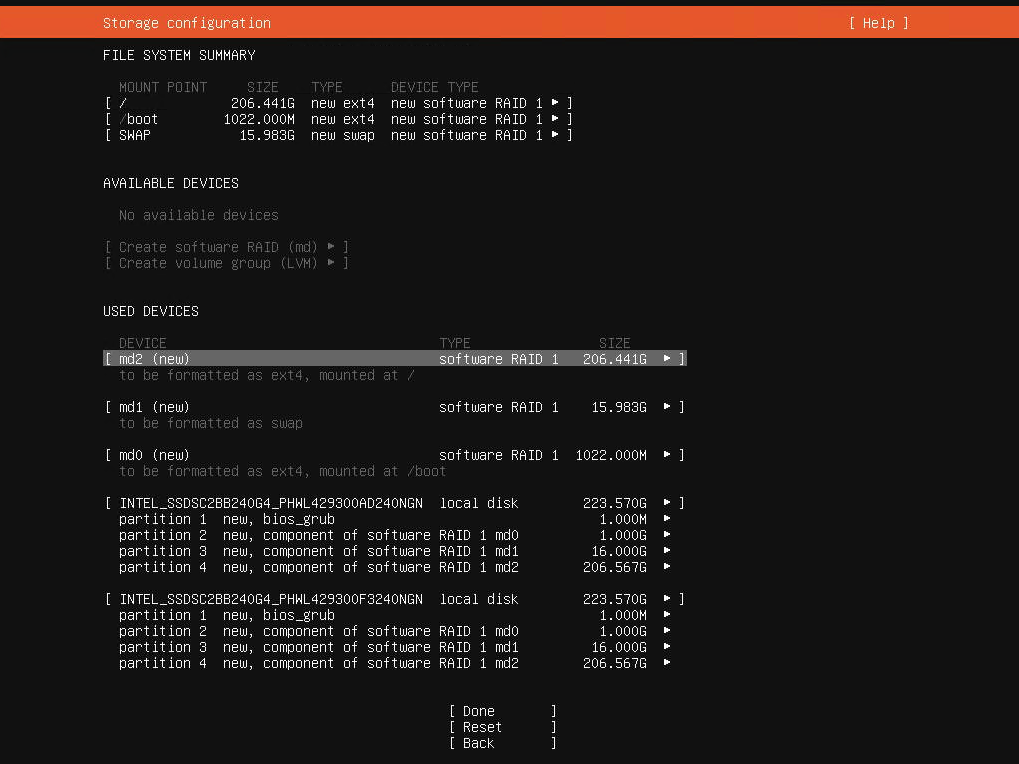
Let's start with the basics: the official guide by Ubuntu (https://ubuntu.com/server/docs/install/storage) is outdated/wrong. And as of March 2021 it's possible that there's a bug as well with how the bios_grub partitions are created when using multiple disks.
Now on to the solution:

| #! /usr/bin/env ruby | |
| # NOTE: Requires Ruby 2.1 or greater. | |
| # This script can be used to parse and dump the information from | |
| # the 'html/contact_info.htm' file in a Facebook user data ZIP download. | |
| # | |
| # It prints all cell phone call + SMS message + MMS records, plus a summary of each. | |
| # | |
| # It also dumps all of the records into CSV files inside a 'CSV' folder, that is created |

| #!/bin/bash | |
| # This script allows you to chroot ("work on") | |
| # the raspbian sd card as if it's the raspberry pi | |
| # on your Ubuntu desktop/laptop | |
| # just much faster and more convenient | |
| # credits: https://gist.github.com/jkullick/9b02c2061fbdf4a6c4e8a78f1312a689 | |
| # make sure you have issued |

| #!/bin/bash | |
| # | |
| # dockerpsns - proof of concept for a "docker ps --namespaces". | |
| # | |
| # USAGE: ./dockerpsns.sh | |
| # | |
| # This lists containers, their init PIDs, and namespace IDs. If container | |
| # namespaces equal the host namespace, they are colored red (this can be | |
| # disabled by setting color=0 below). | |
| # |

| # NOTE: This gist includes the '.sh' extension to enable syntax highlighting | |
| # on the gist web viewer. However, it is NOT intended to be run as a script. | |
| # These are just notes I took. | |
| ################################################################################ | |
| # | |
| # CentOS 7 - Simple IPv4 NAT Router | |
| # | |
| # This gist provides a brief walkthough on setting up a simple NAT router on | |
| # CentOS 7 that will allow multiple machines on an internal network to share |
  sudo apt-get install cpufreq-info cpuspeed cpufrequtils sysfsutils
  # set each core to the "performance" governor, so that the clock frequency doesn't go down when idle
  # I have 8 cores, which is why I need to do this 8 times
  sudo cpufreq-selector -c 0 -g performance

