Skip to content

Instantly share code, notes, and snippets.

@jake-stewart
Last active February 24, 2026 11:47
Show Gist options
  • Select an option

  • Save jake-stewart/0a8ea46159a7da2c808e5be2177e1783 to your computer and use it in GitHub Desktop.

Select an option

Save jake-stewart/0a8ea46159a7da2c808e5be2177e1783 to your computer and use it in GitHub Desktop.
Terminals should generate the 256-color palette

Terminals should generate the 256-color palette from the user's base16 theme.

If you've spent much time in the terminal, you've probably set a custom base16 theme. They work well. You define a handful of colors in one place and all your programs use them.

The drawback is that 16 colors is limiting. Complex and color-heavy programs struggle with such a small palette.

The mainstream solution is to use truecolor and gain access to 16 million colors. But there are drawbacks:

  • Each truecolor program needs its own theme configuration.
  • Changing your color scheme means editing multiple config files.
  • Light/dark switching requires explicit support from program maintainers.
  • Truecolor escape codes are longer and slower to parse.
  • Fewer terminals support truecolor.

The 256-color palette sits in the middle with more range than base16 and less overhead than truecolor. But it has its own issues:

  • The default theme clashes with most base16 themes.
  • The default theme has poor readability and inconsistent contrast.
  • Nobody wants to manually define 240 additional colors.

The solution is to generate the extended palette from your existing base16 colors. You keep the simplicity of theming in one place while gaining access to many more colors.

If terminals did this automatically, then terminal program maintainers would consider the 256-color palette a viable choice, allowing them to use a more expressive color range without requiring added complexity or configuration files.

Understanding the 256-Color Palette

The 256-color palette has a specific layout. If you are already familiar with it, you can skip to the next section.

The Base 16 Colors

The first 16 colors form the base16 palette. It contains black, white, and all primary and secondary colors, each with normal and bright variants.

  1. black
  2. red
  3. green
  4. yellow
  5. blue
  6. magenta
  7. cyan
  8. white
  9. bright black
  10. bright red
  11. bright green
  12. bright yellow
  13. bright blue
  14. bright magenta
  15. bright cyan
  16. bright white

The 216-Color Cube

The next 216 colors form a 6x6x6 color cube. It works like 24-bit RGB but with 6 shades per channel instead of 256.

You can calculate a specific index using this formula, where R, G, and B range from 0 to 5:

16 + (36 * R) + (6 * G) + B

The Grayscale Ramp

The final 24 colors form a grayscale ramp between black and white. Pure black and white themselves are excluded since they can be found in the color cube at (0, 0, 0) and (5, 5, 5).

You can calculate specific index using this formula, where S is the shade ranging from 0 to 23:

232 + S

Problems with the 256-Color Palette

Base16 Clash

The most obvious problem with the 256-color palette is the inconsistency with the user's base16 theme:
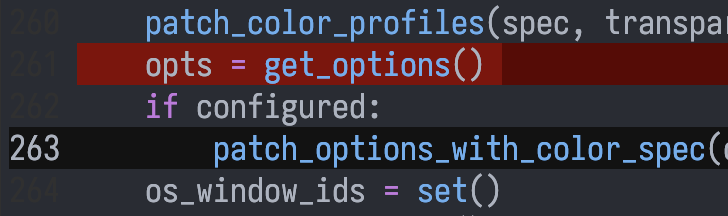
inconsistent theme

Using a custom 256-color palette gives a more pleasing result:
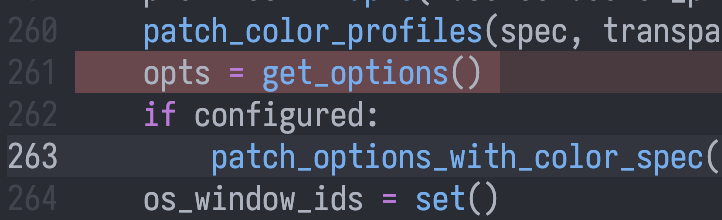
consistent theme

Incorrect Interpolation

The default 216-color cube interpolates between black and each color incorrectly. It is shifted towards lighter shades (37% intensity for the first non-black shade as opposed to the expected 20%), causing readability issues when attempting to use dark shades as background:
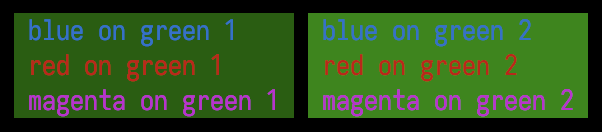
poor readability example

If the color cube is instead interpolated correctly, readability is preserved:

fixed readability example

Inconsistent Contrast

The default 256-color palette uses fully saturated colors, leading to inconsistent brightness against the black background. Notice that blue always appears darker than green, despite having the same shade:
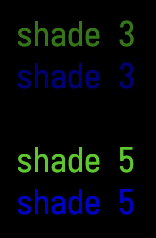
poor readability example

If a less saturated blue is used instead then the consistent brightness is preserved:
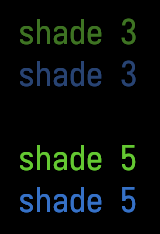
fixed readability example

Generating the Palette

These problems can be solved by generating the 256-color palette from the user's base16 colors.

The base16 palette has 8 normal colors which map to the 8 corners of the 216-color cube. The terminal foreground and background should be used instead of the base16 black and white.

These colors can be used to construct the 216-color cube via trilinear interpolation, and the grayscale ramp with a simple background to foreground interpolation.

By default, light themes should swap foreground and background colors so that color 16 remains black and 231 stays white. This retains compatibility with the default 256-color theme despite being semantically incorrect. An opt-in "harmonious" mode should allow the correct semantics.

The CIELAB colorspace should be used to achieve consistent apparent brightness across hues of the same shade. OKLAB should be avoided due to having less consistent lightness.

Solarized with RGB interpolation:

without lab

Solarized with LAB interpolation:

with lab

Combined image of many generated themes:
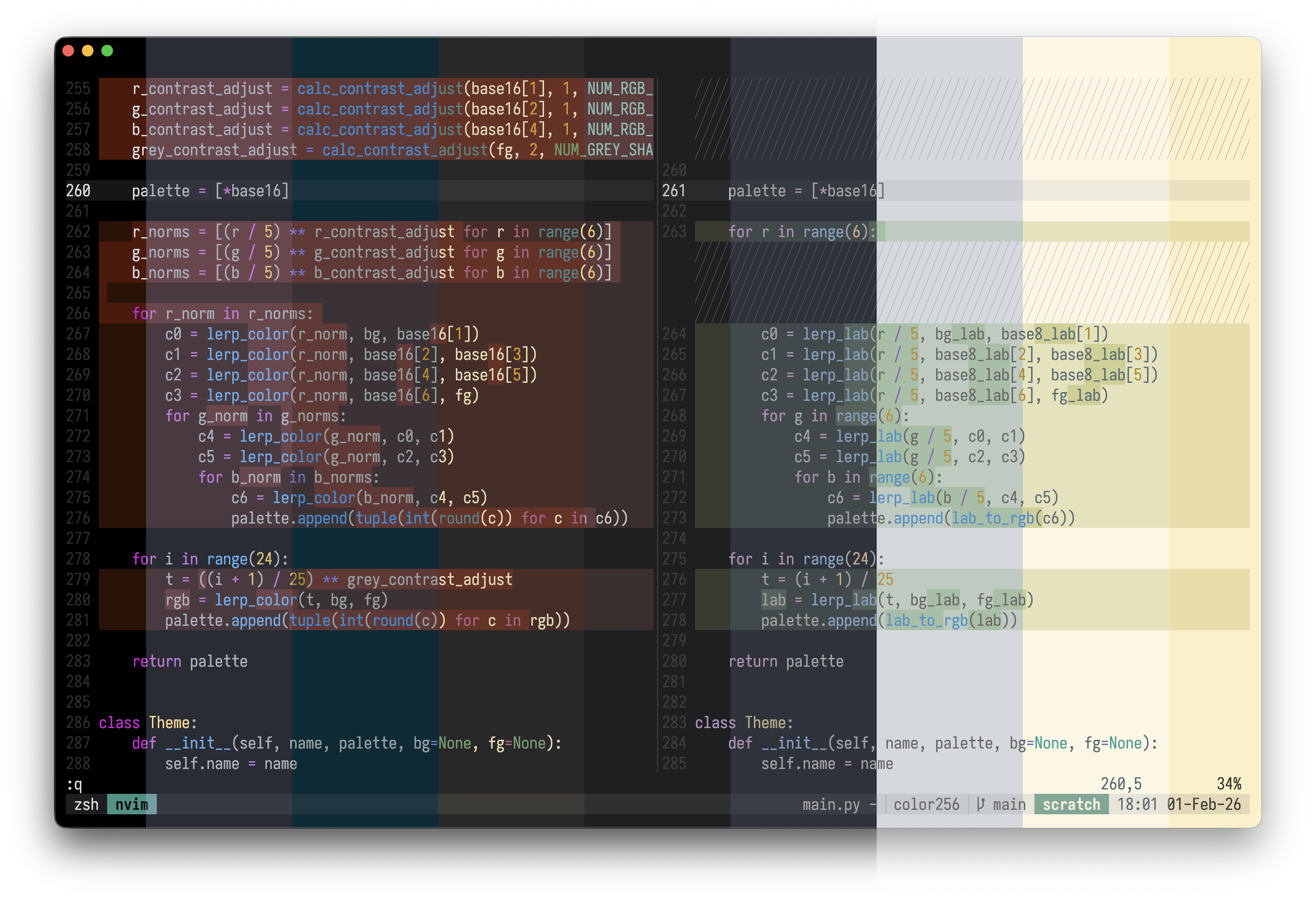
example generated themes

Before and after using 256 palette generation with default colors:
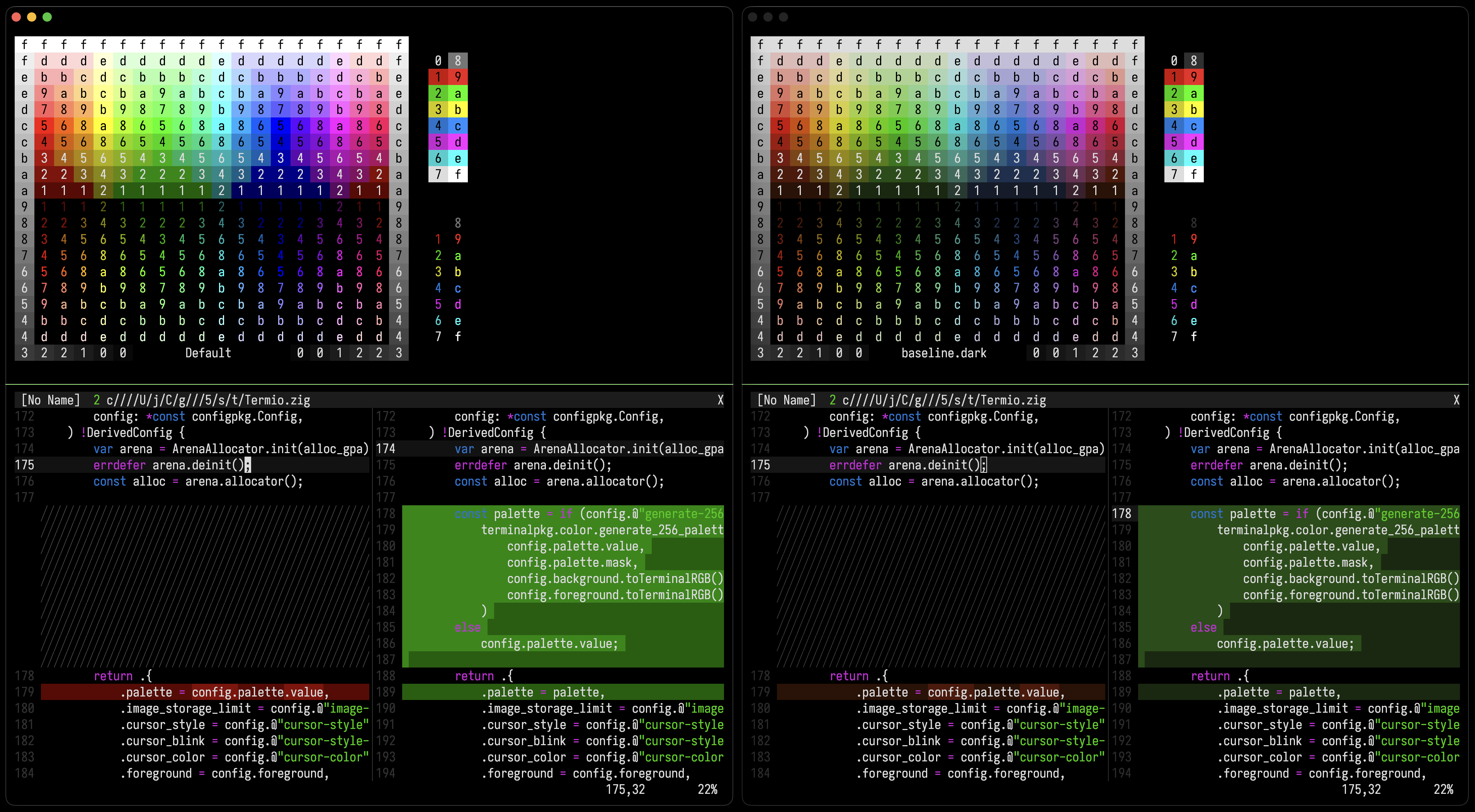
example before and after

Implementation

This code is public domain, intended to be modified and used anywhere without friction.

def lerp_lab(t, lab1, lab2):
    return (
        lab1[0] + t * (lab2[0] - lab1[0]),
        lab1[1] + t * (lab2[1] - lab1[1]),
        lab1[2] + t * (lab2[2] - lab1[2]),
    )

def generate_256_palette(base16, bg, fg, harmonious=False):
    base8_lab = [
        rgb_to_lab(bg),
        rgb_to_lab(base16[1]),
        rgb_to_lab(base16[2]),
        rgb_to_lab(base16[3]),
        rgb_to_lab(base16[4]),
        rgb_to_lab(base16[5]),
        rgb_to_lab(base16[6]),
        rgb_to_lab(fg),
    ]

    is_light_theme = base8_lab[7][0] < base8_lab[0][0]

    if is_light_theme and not harmonious:
        base8_lab[0], base8_lab[7] = base8_lab[7], base8_lab[0]

    palette = [*base16]

    for r in range(6):
        c0 = lerp_lab(r / 5, base8_lab[0], base8_lab[1])
        c1 = lerp_lab(r / 5, base8_lab[2], base8_lab[3])
        c2 = lerp_lab(r / 5, base8_lab[4], base8_lab[5])
        c3 = lerp_lab(r / 5, base8_lab[6], base8_lab[7])
        for g in range(6):
            c4 = lerp_lab(g / 5, c0, c1)
            c5 = lerp_lab(g / 5, c2, c3)
            for b in range(6):
                c6 = lerp_lab(b / 5, c4, c5)
                palette.append(lab_to_rgb(c6))

    for i in range(24):
        t = (i + 1) / 25
        lab = lerp_lab(t, base8_lab[0], base8_lab[7])
        palette.append(lab_to_rgb(lab))

    return palette

Detecting Harmonious Colors

I wrote a python script which demonstrates how to:

  • Detect terminal light/dark theme
  • Detect whether the 256-palette is generated
  • Detect whether the 256-palette is harmonious
  • Handle light/dark palettes seamlessly

Although this is for those who care. Most users should just enable harmonious colors and use the 256-color palette as intended.

Conclusion

The default 256-color palette has room for improvement. Considering its poor readability and its clash with the user's theme, program authors avoid it, opting for the less expressive base16 or more complex truecolor.

Terminals should generate the 256-color palette from the user's base16 theme. This would make the palette a viable option especially considering its advantages over truecolor:

  • Access to a wide color palette without needing config files.
  • Light/dark switching capability without developer effort.
  • Broader terminal support without compatibility issues.
@epage
Copy link

epage commented Feb 18, 2026

Whether opt-in or opt-out, there needs to be a documented way to detect this

  • whether terminal version detection and/or feature detection (preferrably through env)
  • maybe a standardized flag for base16 or color256

@migueldeicaza
Copy link

Incredible, SwiftTerm now has support for it too:

https://github.com/migueldeicaza/SwiftTerm/

@jake-stewart
Copy link
Author

Whether opt-in or opt-out, there needs to be a documented way to detect this

  • whether terminal version detection and/or feature detection (preferrably through env)
  • maybe a standardized flag for base16 or color256

Regardless of whether the terminal supports this new palette generation, each 256-color palette entry points to the same kind of color.

In other words, your program will be correct regardless of whether the terminal uses the default or the generated 256-color palette.

For this reason, I do not consider the distinction important. The generated palette behaves conceptually identical to the default and can be treated as such.

@tracker1
Copy link

Requested for Tabby and MS Terminal

@epage
Copy link

epage commented Feb 18, 2026

For this reason, I do not consider the distinction important. The generated palette behaves conceptually identical to the default and can be treated as such.

Maybe I'm misunderstanding this proposal. One of the reasons I avoid 256-color and truecolor is that they are independent of base16 and could cause readability issues (contrast with the background). I had assumed that this would resolve those readability issues. As such, for a program like cargo or rustc, we would only want to emit 256-color if we know there won't be reaability issues. So we'd need detection for support for this proposal.

@DHowett
Copy link

DHowett commented Feb 18, 2026

Maybe this scheme should be opted into by a new control code?

Many terminal emulators, especially those listed above, support using OSC 4 to change the palette. It is broadly possible to implement this without any terminal emulator support other than that.

@ku1ik
Copy link

ku1ik commented Feb 18, 2026

I think this looks great. I get how people can see 256-color both ways, either as a "stable, low res RGB", or an "extended palette". I lean towards treating it as a palette, and I believe setting it ON by default has potential of making CLIs and TUIs look awesome.

Anyway, I got nerd-sniped by this today and I already implemented this in asciinema player 😅 (I used OKLAB+OKLCH).

Demo using Gruvbox Dark theme here: https://asciinema.org/a/CIyrgpv8Ztlqlk6W

@dgudim
Copy link

dgudim commented Feb 18, 2026

Damn, this is awesome! Immediately tried using it in konsole and it doesn't change the colors 😅 time to open a feature request.

Update: Found existing bug report: https://bugs.kde.org/show_bug.cgi?id=233991
I don't think this is going to be implemented soon unfortunately

@jake-stewart
Copy link
Author

Maybe I'm misunderstanding this proposal. One of the reasons I avoid 256-color and truecolor is that they are independent of base16 and could cause readability issues (contrast with the background). I had assumed that this would resolve those readability issues. As such, for a program like cargo or rustc, we would only want to emit 256-color if we know there won't be reaability issues. So we'd need detection for support for this proposal.

Hopefully, if this approach becomes mainstream enough, you will not need to worry about whether the terminal does it. You should be able to assume it is the case. For now, we can see how this progresses. If mainstream adoption fails then querying may become useful. I do hope we can avoid the need to query, though.

@epage
Copy link

epage commented Feb 18, 2026

Hopefully, if this approach becomes mainstream enough, you will not need to worry about whether the terminal does it. You should be able to assume it is the case. For now, we can see how this progresses. If mainstream adoption fails then querying may become useful. I do hope we can avoid the need to query, though.

With Cargo, we aim to support a wide range of terminals and versions. We don't assume color, unicode, link, or advanced rendering support. We check for what is supported and adapt accordingly.

@zadjii-msft
Copy link

x-linking the Windows Terminal implementation: microsoft/terminal#19883. (our settings model pretty much requires 20 files of changes just for plumbing settings. It's really not that scary of a change 😅)

as a lover of beautiful terminal color schemes, this proposal has brought me a lot of joy. Thanks for a genuinely good idea.

@lhecker
Copy link

lhecker commented Feb 18, 2026

I'd like to add that I see this part with some concern:

The terminal foreground and background should be used instead of the base16 black and white.
[...] and the grayscale ramp with a simple background to foreground interpolation.

Many terminal themes today (and historically) use a default foreground color that is close to index 7 not 15 (= dim, not bright white). An interpolation like that will yield washed out colors. I do not have a good suggestion on how to fix this, but I'd probably suggest picking the colors with min/max lightness instead.

@jake-stewart
Copy link
Author

Hopefully, if this approach becomes mainstream enough, you will not need to worry about whether the terminal does it. You should be able to assume it is the case. For now, we can see how this progresses. If mainstream adoption fails then querying may become useful. I do hope we can avoid the need to query, though.

With Cargo, we aim to support a wide range of terminals and versions. We don't assume color, unicode, link, or advanced rendering support. We check for what is supported and adapt accordingly.

I understand and will think about this more.

@Mgldvd
Copy link

Mgldvd commented Feb 19, 2026

Hi everyone,

I came across this article and really liked the approach. I maintain a repository (Gogh) with dozens of terminal themes, and after reading this post and looking at the original project, I created the necessary .txt files, so these themes can be used directly with the 256-color generator.

The generated .txt theme files are available here:
https://github.com/Gogh-Co/Gogh/tree/master/data/txt

This allows using the example command directly with those themes, for example:

python3 color256.py <(curl -fsSL https://raw.githubusercontent.com/Gogh-Co/Gogh/refs/heads/master/data/txt/acme.txt)
image
python3 color256.py <(curl -fsSL https://raw.githubusercontent.com/Gogh-Co/Gogh/refs/heads/master/data/txt/ayaka.txt
image

@trueNAHO
Copy link

While this might increase the initial scope of this discussion, I would like to add that the NixOS theming framework Stylix is planning to support an internal base-n (general color schemes of any size, like base16, base24, and base256) interface to seemlessly integrate with application-specific color palette sizes. Although there are also plans to eventually leverage potentially multiple semantic color representations alongside base-n representations, it is possible for base-n color schemes to look better than semantic representations in TUIs.

@jake-stewart
Copy link
Author

jake-stewart commented Feb 20, 2026

Whether opt-in or opt-out, there needs to be a documented way to detect this

@epage In this discussion it was brought up that you should be able to query terminal colors for this:

A theme is harmonious if color16=BG and color231==FG. Otherwise detect light theme (BG lighter than FG) and if so, invert the indexes.

@mrclmr
Copy link

mrclmr commented Feb 20, 2026

@jake-stewart Thanks a lot for the effort! It is a true improvement.

I read the comments in the PRs and here and I asked myself why are the people consider OKLAb?

Asking an LLM "Compare cielab vs oklab. And what is the advantage that cielab is ISO standardized?" I get the impression that the ISO Standard is not that important. I also see that CIELAB is a very good solution with no flaws (ghostty-org/ghostty#10554 (comment)). But maybe OKLAb could even better? Just asking from a really superficial standpoint and I have almost no knowledge about color spaces. Perhaps you could shed some light on the considerations involved so that the decision can be better understood ✌🏼

@jake-stewart
Copy link
Author

Asking an LLM "Compare cielab vs oklab. And what is the advantage that cielab
is ISO standardized?" I get the impression that the ISO Standard is not that
important.

But maybe OKLAb could even better?

CIELAB has been around for a very long time. Enough time for it to be
battle-tested and flaws exposed.

OKLAB on the other hand is brand new. Is it better? I don’t know. I can tell
you that it gives less consistent lightness for shades across different themes.
This is a very significant issue for the palette: Shades must be equivalent to
have the same meaning.

I tried lightness correction, gamut clipping, OKLCH, OKHSV, OKHSL. I had to
resort to modifying the documented toe correction function to achieve
consistent lightness.

CIELAB works well and has done for decades. It will work in the future.

@epage
Copy link

epage commented Feb 20, 2026

Whether opt-in or opt-out, there needs to be a documented way to detect this

@epage In this discussion it was brought up that you should be able to query terminal colors for this:

* https://ghostty.org/docs/vt/osc/4

* https://ghostty.org/docs/vt/osc/1x

A theme is harmonious if color16=BG and color231==FG. Otherwise detect light theme (BG lighter than FG) and if so, invert the indexes.

Maybe I'm missing some things but this

  • Looks like it will add extra latency in short lived programs
  • Not quite clear exactly how all of this will work

As I noted, most other behaviors programs are to condition on for the terminal are managed through environment variables these days.

@tracker1
Copy link

As I noted, most other behaviors programs are to condition on for the terminal are managed through environment variables these days.

@epage While I understand the concerns... I'm not sure of the behavior driven for short lived programs... but, personally I'm interested in modernized BBS TUIs that are remote (SSH, Telnet, Websocket, etc) and don't effectively have environment variables for this and need behavioral detection at the least. In fact been considering sending OSC4 commands by default so ANSi art would display correctly on modern terminals by default along with feature detection.

Aside, kind of wild to see so much discussion on terminal interfaces... I just hope that remote applications are at least considered in terms of being able to do feature detection as features are added. I'd rather not rely explicitly on extensions to telnet or ssh in favor of sockets expressly for the BBS type use case, where connections are passed to other (door) programs.

@basiclines
Copy link

basiclines commented Feb 20, 2026

Love the approach, kind of reminds me to colorspaces:
A strong boundary of available colors and some functions to grab them from the space.

Just built some wrapping about this concept for rampa-sdk. Hope it might be useful to more people!
Its fully open-source: https://github.com/basiclines/rampa-studio/blob/main/sdk/README.md

PS: Supports oklch and lab interpolations

Screen.Recording.2026-02-20.at.23.30.32_compressed.mp4
import { LinearColorSpace, CubeColorSpace } from '@basiclines/rampa-sdk';

/**
 * Build color space functions for a given theme.
 * Returns tint, neutral, base, bright — all returning hex directly.
 */
function buildColorSpace(theme) {
  const tint = new CubeColorSpace({
    k: theme.bg,
    r: theme.base16[1],
    g: theme.base16[2],
    b: theme.base16[4],
    y: theme.base16[3],
    m: theme.base16[5],
    c: theme.base16[6],
    w: theme.fg,
  }).size(6);

  const neutral = new LinearColorSpace(theme.bg, theme.fg).size(24);

  // Plain lookup tables — no interpolation
  // Wrap with name→index mapping for base('r'), bright('r') syntax
  const baseTable   = new LinearColorSpace(...theme.base16.slice(0, 8)).interpolation(false).size(8);
  const brightTable = new LinearColorSpace(...theme.base16.slice(8, 16)).interpolation(false).size(8);
  const base   = (name) => baseTable(baseMap[name] + 1);
  const bright = (name) => brightTable(baseMap[name] + 1);
  base.palette   = baseTable.palette;
  bright.palette = brightTable.palette;

  // Build full 256-color palette for Ghostty config output
  const palette = [
    ...base.palette,      // 0-7
    ...bright.palette,    // 8-15
    ...tint.palette,      // 16-231
    ...neutral.palette,   // 232-255
  ];

  return { tint, neutral, base, bright, palette };
}

@jake-stewart
Copy link
Author

jake-stewart commented Feb 21, 2026

Not quite clear exactly how all of this will work

I made a demo.

This is for people who care and projects that aim to be widely accessible.

I think the average user will just enable harmonious colors and use the 256-color palette as intended.

@o-sdn-o
Copy link

o-sdn-o commented Feb 23, 2026

If terminals did this automatically, then terminal program maintainers would consider the 256-color palette a viable choice, allowing them to use a more expressive color range without requiring added complexity or configuration files.

I believe that instead of relying on the terminal to generate an extended palette, terminal program maintainers should adopt alpha overlays in their own rendering logic. (I think the 256-color RGB-cube palette should remain untouched if it is)

By using non-PMA (Straight Alpha) alpha blending internally, a program can use a single 'brush', like dark blue at 25% alpha to calculate the final color and emit the truecolor output to the terminal. A single RGBA value (e.g., #00008040) works universally as a highlight on dark backgrounds and a tint/dim on light backgrounds. The maintainer doesn't need to ship separate color logic for different themes. Since the blending happens against the user's current base16 background, the UI remains perfectly harmonious regardless of the color scheme.

To visually experiment with non-PMA blending (on MS Windows only), you can use vtm (vtm --run term). It has the ability to render semi-transparent text output (using non-standard \e[48:2::R:G:B:Am) while rendering its own GUI window in non-PMA mode. By placing a custom background under the vtm GUI window, you can directly see the results of non-PMA alpha blending:

  • pwsh
    "`e[48:2:0:0:0:0m `e[36b`n  `e[30;48:2::0:0:128:64m Some Contrasting `e[37m Text Fragment `e[48:2:0:0:0:0m  `
    `e[48:2:0:0:0:0m `e[36b`n  `e[30;48:2::0:128:0:64m Some Contrasting `e[37m Text Fragment `e[48:2:0:0:0:0m  `
    `e[48:2:0:0:0:0m `e[36b`n  `e[30;48:2::128:0:0:64m Some Contrasting `e[37m Text Fragment `e[48:2:0:0:0:0m  `
    `e[48:2:0:0:0:0m `e[36b`n  `e[30;48:2::0:128:128:64m Some Contrasting `e[37m Text Fragment `e[48:2:0:0:0:0m  `
    `e[48:2:0:0:0:0m `e[36b`n  `e[30;48:2::128:128:0:64m Some Contrasting `e[37m Text Fragment `e[48:2:0:0:0:0m  `
    `e[48:2:0:0:0:0m `e[36b`n  `e[30;48:2::128:0:128:64m Some Contrasting `e[37m Text Fragment `e[48:2:0:0:0:0m  `
     `e[36b`n`e[m"
image image

To clarify: The vtm alpha-parameter is just a visual lab. My idea is just to allow apps to blend colors internally and output a standard truecolor.

Sign up for free to join this conversation on GitHub. Already have an account? Sign in to comment
