This technical documentation outlines the engineering foundation of ZenClock. It focuses on the high-performance rendering of radial UI, a decoupled architecture using custom internal libraries, and a robust monetization layer.
ZenClock is built to be lightweight, performant, and visually precise.
- Framework: Flutter (Channel Stable)
- Language: Dart 3.x (Utilizing records, patterns, and class modifiers)
- State Management:
alien_signals(for high-frequency UI updates) &Provider(for dependency injection) - Routing: ZenRouter (Custom-built for declarative, state-aware navigation)
- Event Handling: ZenBus (Signal-based implementation for internal app communication)
- Local Storage: Hive (for ultra-fast caching of calendar metadata)
- Calendar Integration:
device_calendarfor native OS bridge.
The app follows a modified Clean Architecture pattern to ensure the rendering logic is entirely decoupled from the data sourcing.
- Presentation Layer: * Uses a Radial Coordinate System to map
DateTimeobjects to polar coordinates.
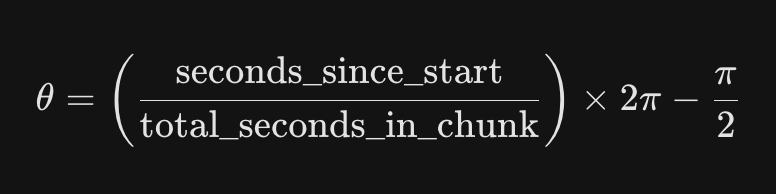
- Calculates angles using:
- Domain Layer:
- Contains the
EventArcentities and the "Focus Chunking" logic. - Includes the Arc Merging Algorithm, which identifies overlapping events and calculates nested radii to prevent visual collisions.
- Data Layer:
- Repositories handle the synchronization between the local device calendar and the app's reactive signals.
- ZenRouter Integration: Handles the transition between the Circle View and Traditional Views using custom
PageRoutesthat support shared-element "Hero" animations of the calendar arcs. - ZenBus: Facilitates low-latency updates when the "Time Needle" moves, triggering re-renders of the time-remaining labels across different UI components without deep prop-drilling.
The monetization logic is centralized via a BillingService to handle the ZenClock Pro entitlements.
- Initialization: Configured with API keys for both iOS and Android during the app boot sequence.
- Entitlements: We define a single
pro_featuresentitlement that unlocks the "Auto-Refresh Wallpaper" and "Pro Navigation" features.
// Example of the ZenClock Pro check
final customerInfo = await Purchases.getCustomerInfo();
if (customerInfo.entitlements.all['pro_features']?.isActive ?? false) {
  // Unlock Zen Pro UI and background services
  _isPro.value = true;
}
- Offerings: The app fetches the
currentoffering to display the monthly and annual price strings dynamically. - Restoration: A "Restore Purchase" button is located in the Settings view to allow users to sync entitlements across devices.
- Webhooks: RevenueCat webhooks are configured to listen for subscription cancellations to instantly update the "Pulse" background service status.
To maintain 120fps on modern devices, the clock face is rendered via CustomPainter. The arcs are drawn using the canvas.drawArc method, with the stroke width and sweep angle calculated based on the event duration relative to the current "Focus Chunk."
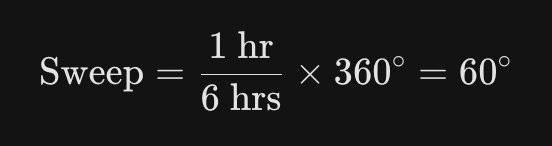
For a 6-hour focus chunk, an event of 1 hour is represented by a sweep angle of: