
-
-
Save codigoconjuan/5fb3278ba3b68d23267393abd7d1d605 to your computer and use it in GitHub Desktop.
| <!DOCTYPE html> | |
| <html lang="en"> | |
| <head> | |
| <meta charset="utf-8" /> | |
| <link rel="icon" href="%PUBLIC_URL%/favicon.ico" /> | |
| <meta name="viewport" content="width=device-width, initial-scale=1" /> | |
| <meta name="theme-color" content="#000000" /> | |
| <meta | |
| name="description" | |
| content="Web site created using create-react-app" | |
| /> | |
| <link rel="apple-touch-icon" href="logo192.png" /> | |
| <link rel="manifest" href="%PUBLIC_URL%/manifest.json" /> | |
| <link rel="stylesheet" href="https://cdnjs.cloudflare.com/ajax/libs/normalize/8.0.1/normalize.min.css"> | |
| <link href="https://fonts.googleapis.com/css?family=Raleway:400,900|Roboto:300,400,700&display=swap" rel="stylesheet"> | |
| <title>MERNTasks</title> | |
| </head> | |
| <body> | |
| <noscript>You need to enable JavaScript to run this app.</noscript> | |
| <div id="root"></div> | |
| </body> | |
| </html> |
| :root { | |
| --blanco: #ffffff; | |
| --gris1: #edf2f6; | |
| --gris2: #2f3848; | |
| --gris3: #1a202d; | |
| --negro: #000000; | |
| --headingFont:'Raleway', sans-serif; | |
| --textFont: 'Roboto', sans-serif; | |
| } | |
| *, *:before, *:after { | |
| box-sizing: inherit; | |
| } | |
| html { | |
| box-sizing: border-box; | |
| height: 100%; | |
| font-size: 62.5%; | |
| } | |
| body { | |
| min-height: 100%; | |
| background-color: var(--gris1); | |
| font-size: 16px; | |
| font-size: 1.6rem; | |
| font-family: var(--textFont); | |
| } | |
| h1, h2 { | |
| font-family: var(--headingFont); | |
| font-weight: 900; | |
| margin: 0 0 4rem 0; | |
| text-align: center; | |
| color: var(--gris2); | |
| } | |
| h1 span { | |
| font-weight: 400; | |
| } | |
| h1 { | |
| font-size: 3rem; | |
| } | |
| h2 { | |
| font-size: 2.4rem; | |
| } | |
| ul { | |
| list-style: none; | |
| padding: 0; | |
| margin: 0; | |
| } | |
| a { | |
| text-decoration: none; | |
| color: var(--gris2); | |
| } | |
| /** BOTONES **/ | |
| .btn { | |
| margin-top: 2rem; | |
| font-family: var(--headingFont); | |
| padding: 1.5rem; | |
| font-size: 1.4; | |
| font-weight: 400; | |
| border-radius: .5rem; | |
| border: none; | |
| transition: background-color .3s ease; | |
| } | |
| .btn:hover { | |
| cursor: pointer; | |
| } | |
| .btn-primario { | |
| background-color: var(--gris2); | |
| color: var(--blanco); | |
| } | |
| .btn-primario:hover { | |
| background: var(--gris3); | |
| } | |
| .btn-secundario { | |
| background-color: var(--gris1); | |
| } | |
| .btn-block { | |
| display: block; | |
| width: 100%; | |
| } | |
| .btn-submit:hover { | |
| background-color: var(--gris2); | |
| } | |
| .btn-blank { | |
| margin: 0; | |
| padding: 0; | |
| display: block; | |
| background-color: transparent; | |
| } | |
| @media (min-width: 768px) { | |
| .contenedor-app { | |
| display: flex; | |
| min-height: 100vh; | |
| } | |
| aside { | |
| background-color: var(--blanco); | |
| flex: 0 0 300px; | |
| } | |
| .seccion-principal { | |
| flex: 1; | |
| } | |
| } | |
| /* BARRA LATERAL */ | |
| aside { | |
| padding: 3rem; | |
| } | |
| .formulario-nuevo-proyecto { | |
| margin-top: 6rem; | |
| } | |
| .formulario-nuevo-proyecto .input-text { | |
| border-bottom: 1px solid var(--gris2); | |
| border-radius: 0; | |
| background-color: var(--gris1); | |
| } | |
| .formulario-nuevo-proyecto .input-text::placeholder{ | |
| color: var(--gris2); | |
| } | |
| .proyectos { | |
| margin-top: 10rem; | |
| } | |
| .listado-proyectos li { | |
| margin-bottom: 2rem; | |
| } | |
| .listado-proyectos li a { | |
| font-size: 1.4rem; | |
| color: var(--gris2); | |
| line-height: 1.5; | |
| font-weight: 300; | |
| } | |
| .app-header { | |
| display: flex; | |
| justify-content: space-between; | |
| background-color: var(--gris2); | |
| padding: 4rem; | |
| } | |
| .nombre-usuario { | |
| color: var(--blanco); | |
| font-size: 2.2rem; | |
| margin: 0; | |
| } | |
| .nombre-usuario span { | |
| font-weight: 900; | |
| } | |
| .nav-principal a { | |
| color: var(--blanco); | |
| text-decoration: none; | |
| } | |
| .nav-principal a:first-of-type { | |
| margin-right: 2rem; | |
| } | |
| /** Formulario crear y editar tareas **/ | |
| .formulario { | |
| background-color: var(--gris3); | |
| padding: 4rem; | |
| } | |
| .formulario form { | |
| max-width: 600px; | |
| margin: 0 auto; | |
| } | |
| .contenedor-input { | |
| display: flex; | |
| } | |
| .contenedor-input label { | |
| margin-bottom: 1rem; | |
| color: var(--blanco); | |
| } | |
| .input-text { | |
| padding: 1rem; | |
| border: none; | |
| border-radius: .5rem; | |
| flex: 1; | |
| width: 100%; | |
| } | |
| /** TAREAS LISTADO **/ | |
| .contenedor-tareas { | |
| padding: 4rem; | |
| } | |
| .listado-tareas { | |
| max-width: 600px; | |
| margin: 0 auto; | |
| } | |
| .tarea { | |
| display: flex; | |
| justify-content: space-between; | |
| background-color: var(--blanco); | |
| padding: .5rem 2rem; | |
| align-items: center; | |
| margin-bottom: 1rem; | |
| border-radius: .5rem; | |
| } | |
| .sombra { | |
| -webkit-box-shadow: 0px 4px 10px -3px rgba(117,117,117,1); | |
| -moz-box-shadow: 0px 4px 10px -3px rgba(117,117,117,1); | |
| box-shadow: 0px 4px 10px -3px rgba(117,117,117,1); | |
| } | |
| .sombra-dark { | |
| -webkit-box-shadow: 0px 6px 11px -8px rgba(0,0,0,0.9); | |
| -moz-box-shadow: 0px 6px 11px -8px rgba(0,0,0,0.9); | |
| box-shadow: 0px 6px 11px -8px rgba(0,0,0,0.9); | |
| } | |
| .tarea .acciones .btn:first-of-type { | |
| margin-right: 1rem; | |
| } | |
| .tarea p { | |
| font-size: 1.6rem; | |
| flex: 1; | |
| padding-right: 2rem; | |
| } | |
| .tarea .btn { | |
| padding: .8rem; | |
| font-size:1.4rem; | |
| border-radius: 0; | |
| margin: 0; | |
| } | |
| .estado { | |
| margin-right: 1rem; | |
| } | |
| .estado button, | |
| .mensaje { | |
| font-weight: 900; | |
| font-family: var(--textFont); | |
| font-size: 1rem; | |
| padding: .5rem; | |
| border-radius: .5rem; | |
| cursor: pointer; | |
| border: none; | |
| } | |
| .mensaje { | |
| text-align: center; | |
| font-size: 1.6rem; | |
| border-radius: 0; | |
| } | |
| .mensaje:hover { | |
| cursor: default; | |
| } | |
| .completo, | |
| .correcto { | |
| background-color: rgba(154, 252, 154, .3); | |
| color: var(--gris3); | |
| } | |
| .incompleto{ | |
| background-color: rgba(255, 178, 178, .4); | |
| color: var(--gris3); | |
| } | |
| .error { | |
| max-width: 600px; | |
| margin: 2rem auto 0 auto; | |
| background-color: rgb(170, 0, 0); | |
| color: var(--blanco); | |
| } | |
| .tarea-enter, | |
| .proyecto-enter { | |
| opacity: 0; | |
| } | |
| .tarea-enter-active, | |
| .proyecto-enter-active { | |
| opacity: 1; | |
| transition: opacity 200ms; | |
| } | |
| .tarea-exit, | |
| .proyecto-exit { | |
| opacity: 1; | |
| } | |
| .tarea-exit-active, | |
| .proyecto-exit-active { | |
| opacity: 0; | |
| transition: opacity 200ms; | |
| } | |
| .form-usuario { | |
| background-color: var(--gris2); | |
| height: 100vh; | |
| min-height: 800px; | |
| display: flex; | |
| align-items: center; | |
| justify-content: center; | |
| } | |
| .contenedor-form { | |
| padding: 5rem 3rem; | |
| max-width: 500px; | |
| width: 95%; | |
| background-color: var(--blanco); | |
| border-radius: 1rem; | |
| } | |
| .campo-form { | |
| display: flex; | |
| margin-bottom: 2rem; | |
| align-items: center; | |
| } | |
| .campo-form:last-of-type { | |
| margin: 0; | |
| } | |
| .campo-form label { | |
| flex: 0 0 100px; | |
| font-family: var(--textFont); | |
| } | |
| .campo-form input[type="password"], | |
| .campo-form input[type="email"], | |
| .campo-form input[type="text"] { | |
| border: 1px solid #e1e1e1; | |
| padding: 1rem; | |
| flex: 1; | |
| } | |
| .enlace-cuenta { | |
| margin-top: 2rem; | |
| display: block; | |
| opacity: .7; | |
| } |


Gracias amigo :)

Gracias!

Gracias Hermano.

Hola, a alguien le ocurre que la aplicación no se actualiza en hot reload, y hay que actualizar manualmente desde el navegador?

Hay un pequeño error en el CSS que hace que no se vea el texto de los botones:
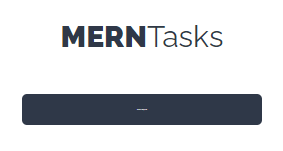
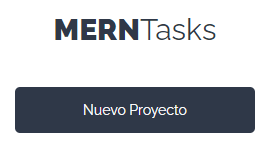
Es debido a la clase btn, falta poner la unidad de medida en el font-size:
font-size: 1.4rem;

Me percaté de que la clase btn-eliminar no se encuentra en el css, la dejo aquí por si acaso
.btn-eliminar {
  background-color: var(--blanco);
}

Encontré un pequeño error que los inputs del login o register cuando los visualizas desde un cel o al menos del mio, lo inputs se salen del contenedor lo que hice fue ir al css y en la parte de:
.campo-form input[type="password"], .campo-form input[type="email"], .campo-form input[type="text"] { border: 1px solid #e1e1e1; padding: 1rem; flex: 1; }
agregas:
width: calc(100% - 32px);
al menos asi se me solucionó

A alguien le salio este error en el front al agregar una nueva tarea? findDOMNode is deprecated in StrictMode. findDOMNode was passed an instance of Transition which is inside StrictMode.
NOTA: Momentaneamente lo solucione modificando el index.js del proyecto sacando el <React.StrictMode> y solo dejando el si alguien sabe otra manera mejor que me lo haga saber.. todos estamos aprendiendo las mejores practicas, tiene que ver con las transiciones el problema

Muchas gracias ivan

A alguien le salio este error en el front al agregar una nueva tarea? findDOMNode is deprecated in StrictMode. findDOMNode was passed an instance of Transition which is inside StrictMode.
NOTA: Momentaneamente lo solucione modificando el index.js del proyecto sacando el <React.StrictMode> y solo dejando el si alguien sabe otra manera mejor que me lo haga saber.. todos estamos aprendiendo las mejores practicas, tiene que ver con las transiciones el problema
hola @juanluisoropeza , creo que es por el prop del tag/componente CSSTransition, yo lo cambie de className a classNames y me funciono la animacion, aunque el error me sigue saliendo, pense que era eso

Gracias a todos

Hola, quería hacer un comentario, pues no es necesario importar los types dentro de state (ej. proyectoState) solo basta poner el nombre del type en string dentro del dispatch, algo así:
dispatch({
type: "FORMULARIO_PROYECTO"
});

En el Login el mensaje "Usuario no existe" me aparece también cuando cuando un usuario envía el formulario vacío. Alguno sabe como solucionar eso?

buenas noches , empezando el proyecto de MERNTasks me sale este error ./src/App.js
Attempted import error: 'Switch' is not exported from 'react-router-dom'.
en internet dicen q swtich ahora es routes, y una vez que lo cambio igual no me sale nada en la pagina web

Para los que tengan el error con la nueva versión de:
Attempted import error: 'Switch' is not exported from 'react-router-dom'.
Encontré esta solucion:
https://stackoverflow.com/questions/63124161/attempted-import-error-switch-is-not-exported-from-react-router-dom
Por lo que nuestro código debería quedar así:
`import { BrowserRouter as Router, Routes, Route } from 'react-router-dom'
import Login from './components/auth/Login'
import NuevaCuenta from './components/auth/NuevaCuenta'
import Proyectos from './components/proyectos/Proyectos'
function App() {
return (
<Route path='/' element={} />
<Route path='/nueva-cuenta' element={} />
<Route path='/proyectos' element={} />
)
}
export default App`
El video está hecho con React Router v5.
Si no fuerzan la instalación de esa version, y como yo, instalan la v6, luego de encontrarse con el problema del Switch, que ya pasé la solucion, se van a encontrar en el video 417, de Autenticar y redirigir al usuario, que les da un error pq no le llegan las props.
Para solucionarlo tienen que importar:
import { Link, useNavigate } from 'react-router-dom'
asignar la funcion:
let navigate = useNavigate()
y en vez de;
props.history.push('/proyectos');
deben usar:
navigate('/proyectos')
La información fue obtenida de la documentacion oficial en https://reactrouter.com/docs/en/v6/upgrading/v5#advantages-of-route-element
El ultimo problema con el que se van a encontrar es en el video 425, cuando quiere hacer la ruta privada.
Tiene que ser asi e App:
<Routes> <Route path='/' element={<Login />} /> <Route path='/nueva-cuenta' element={<NuevaCuenta />} /> <Route element={<RutaPrivada />}> <Route path='/proyectos' element={<Proyectos />} /> </Route> </Routes>
Y esta la RutaPrivada:
`import React, { useContext, useEffect } from 'react'
import { Outlet, Navigate } from 'react-router-dom'
import AuthContext from '../../context/autenticacion/authContext'
import Login from '../auth/Login'
const RutaPrivada = () => {
const authContext = useContext(AuthContext)
const { autenticado, cargando, usuarioAutenticado } = authContext
useEffect(() => {
	usuarioAutenticado()
}, [])

return autenticado || cargando ? <Outlet /> : <Navigate to='/' />
}
export default RutaPrivada`

Hola, buenas. Con el proyecto MERN ya finalizado y hecho el deployment me pasa que al estar en la ruta /nueva-cuenta o en la ruta /proyectos y recargo la página, me sale un error de "Page not found" el cual trabajando en "local" no me salía. No se si soy al único al que le pasa. Debe ser un problema de Netlify?
En el enlace al "support Guide" de Netlify sobre estre problema, dice:
We attempt to serve only /index.html in case you try to load your site without a path, for example:
https://yourdomain.name/
Gracias

Encontré un pequeño error que los inputs del login o register cuando los visualizas desde un cel o al menos del mio, lo inputs se salen del contenedor lo que hice fue ir al css y en la parte de...
El error que econtro @mijecaap tambien se puede solucionar asi en el css:
button, input {
overflow: hidden;
}
Gracias!!