
Why
sudo echo "something" > /path/to/protected/file.txtdoesn’t work and what to do instead.
If you are working on the command-line and you want to write output to a file, sooner or later you come up with this command: echo "output" > file.
This is called a “Redirection”. This works wonderfully and you go on your merry way.
Sometime later, you need to do the same thing with a protected file.
So you do:
echo "something" > /path/to/protected/file.txtAnd are slightly disappointed to find that the computer says “No”. Or to be more precise:
/path/to/protected/file.txt: Permission deniedNot to worry, you are no n00b, you know how to sudo!
sudo echo "something" > /path/to/protected/file.txtBut then horror! Madness! Despair! (or at least a minor case of WTF!?), you get that warning again!
/path/to/protected/file.txt: Permission deniedWhat is going on? Well, the sudo command only applies to the echo command. It does not apply to the pipe >. This means it has the same effect as being called without the sudo. That is why we are seeing that error.
So, what to do?
In bash core-utils, there is a command called tee. This command reads from standard input and writes to standard output and any files given as a parameter. In other words: output comes in from one side and is split into two separate streams. One goes to standard output, the other to file(s).
You can think of it as a T-junction for output (hence the name).
TK: Replace the image from the wiki below with a custom SVG image (using the example from this file and custom colors).
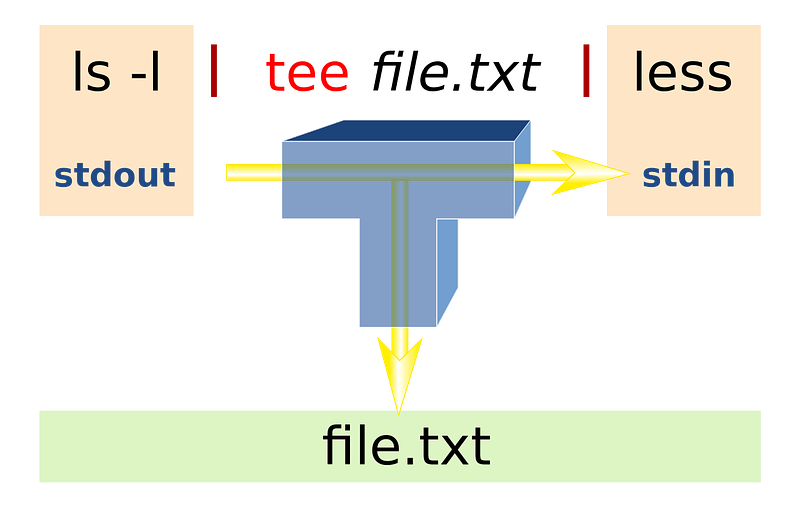
Because this is a separate command, we can use it with sudo .
We can pipe output to tee (called with sudo):
echo "something" | sudo tee /path/to/protected/file.txtand everything works! You will notice that the word “something” has also been written to your screen
**ben@muze.nl**:**~**$ echo "something" | sudo tee file.txt
something
This is because that's whattee does! If you have lots of input that might not be what you want. The solution is redirecting the output of tee to the black hole called/dev/null.
echo "something" | sudo tee file.txt > /dev/nullNow no output is shown. 🎉
What’s that you say? Your file gets overwritten? You want to append output to the file? With redirection, you would simply append the redirected output using >> :
echo "output" >> fileSo how does that work with tee? The tee command comes with an append option. It is invoked by calling tee with an --append flag (or the -a shorthand). So we get:
echo "something" | sudo tee -a file.txt > /dev/nullAnd that is how to redirect output as sudo to a protected file on the CLI!
Have an idea for another “Bash shorts”? Maybe a question or feedback? Feel free to comment below or send me a tweet at @potherca.