Skip to content

Instantly share code, notes, and snippets.

@JBlond
Forked from iamnewton/bash-colors.md
Last active December 28, 2025 05:39
Show Gist options
  • Select an option

  • Save JBlond/2fea43a3049b38287e5e9cefc87b2124 to your computer and use it in GitHub Desktop.

Select an option

Save JBlond/2fea43a3049b38287e5e9cefc87b2124 to your computer and use it in GitHub Desktop.
The entire table of ANSI color codes.

Regular Colors

Value Color
\e[0;30m Black
\e[0;31m Red
\e[0;32m Green
\e[0;33m Yellow
\e[0;34m Blue
\e[0;35m Purple
\e[0;36m Cyan
\e[0;37m White

Bold

Value Color
\e[1;30m Black
\e[1;31m Red
\e[1;32m Green
\e[1;33m Yellow
\e[1;34m Blue
\e[1;35m Purple
\e[1;36m Cyan
\e[1;37m White

Underline

Value Color
\e[4;30m Black
\e[4;31m Red
\e[4;32m Green
\e[4;33m Yellow
\e[4;34m Blue
\e[4;35m Purple
\e[4;36m Cyan
\e[4;37m White

Background

Value Color
\e[40m Black
\e[41m Red
\e[42m Green
\e[43m Yellow
\e[44m Blue
\e[45m Purple
\e[46m Cyan
\e[47m White

High Intensity

Value Color
\e[0;90m Black
\e[0;91m Red
\e[0;92m Green
\e[0;93m Yellow
\e[0;94m Blue
\e[0;95m Purple
\e[0;96m Cyan
\e[0;97m White

Bold High Intensity

Value Color
\e[1;90m Black
\e[1;91m Red
\e[1;92m Green
\e[1;93m Yellow
\e[1;94m Blue
\e[1;95m Purple
\e[1;96m Cyan
\e[1;97m White

High Intensity backgrounds

Value Color
\e[0;100m Black
\e[0;101m Red
\e[0;102m Green
\e[0;103m Yellow
\e[0;104m Blue
\e[0;105m Purple
\e[0;106m Cyan
\e[0;107m White

Reset

Value Color
\e[0m Reset

other styles

echo -e "\e[1mbold\e[0m"
echo -e "\e[3mitalic\e[0m"
echo -e "\e[3m\e[1mbold italic\e[0m"
echo -e "\e[4munderline\e[0m"
echo -e "\e[9mstrikethrough\e[0m"
echo -e "\e[31mHello World\e[0m"
echo -e "\x1B[31mHello World\e[0m"
#!/bin/sh
printf "\e[0;30mBlack \e[1;30mbold Black \e[0;90mhigh intensity Black\n"
printf "\e[0;31mRed \e[1;31mbold Red \e[0;91mhigh intensity Red\n"
printf "\e[0;32mGreen \e[1;32mbold Green \e[0;92mhigh intensity Green\n"
printf "\e[0;33mYellow \e[1;33mbold Yellow \e[0;93mhigh intensity Yellow\n"
printf "\e[0;34mBlue \e[1;34mbold Blue \e[0;94mhigh intensity Blue\n"
printf "\e[0;35mPurple \e[1;35mbold Purple \e[0;95mhigh intensity Purple\n"
printf "\e[0;36mCyan \e[1;36mbold Cyan \e[0;96mhigh intensity Cyan\n"
printf "\e[0;37mWhite \e[1;37mbold White \e[0;97mhigh intensity White\n"
@JBlond
Copy link
Author

JBlond commented Jul 24, 2017

  ColorNames=( Black Red Green Yellow Blue Magenta Cyan White )
  FgColors=(    30   31   32    33     34   35      36   37  )
  BgColors=(    40   41   42    43     44   45      46   47  )


printf " \033[0m$modifiedfiles_number""x\e[41m●\033[0m"

@dustinaja
Copy link

dustinaja commented Mar 9, 2021

I also found this helpful to see a few more color codes in putty.

http://jafrog.com/2013/11/23/colors-in-terminal.html

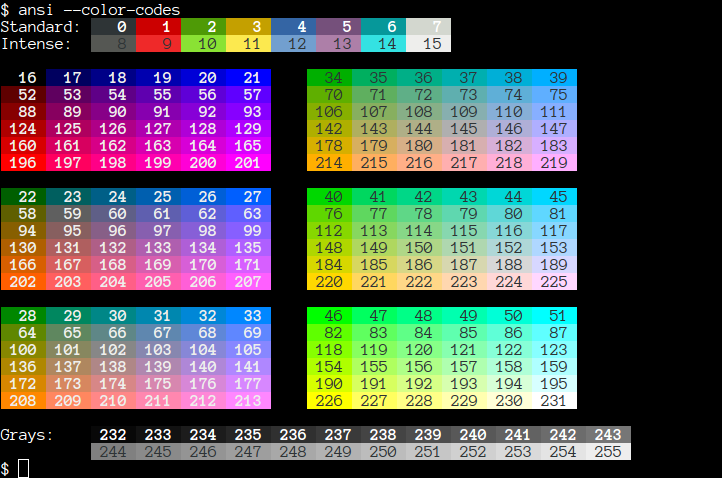
> for code in {0..255}
    do echo -e "\e[38;5;${code}m"'\\e[38;5;'"$code"m"\e[0m"
  done

@arNparad0x
Copy link

@Gamer069
Copy link

pls add dark red

@JBlond
Copy link
Author

JBlond commented Feb 17, 2023

@Gamer069 Background or font color red?

\e[38;5;88m or \e[38;5;52m for font

@funicat1
Copy link

Thanks

@VKontaktist
Copy link

VKontaktist commented Feb 21, 2023

I need pink font color in terminal, please add it

upd:
I found a solution to my problem. I was able to link in the answer of the arNparad0x. In order to use 256 colors from tables, you need to prefix 38;5 in front. For example: i got pink by adding a line \e[38;5;212m

@Reynolds21
Copy link

How to get light grey?

@JBlond
Copy link
Author

JBlond commented Feb 23, 2023

@Reynolds21 Try these

\e[38;5;248m
\e[38;5;249m
\e[38;5;250m
\e[38;5;251m

@arNparad0x
Copy link

arNparad0x commented Feb 23, 2023


use this
and,


for foreground:
\e[38;5;123m or \\033[38;5;123m


for background:
\e[48;5;123m or \\033[48;5;123m


change 123 to the color-code you need


example:

echo -e "\\033[38;5;15mGit\\033[38;5;0m\\033[48;5;208mhub\\033[0m"

@warriorCavt
Copy link

warriorCavt commented Dec 16, 2023

Is there italic with colors?
Because if I add \033[3m, there's no italic and the colors are inverted.

@JBlond
Copy link
Author

JBlond commented Dec 16, 2023

@warriorCavt

echo -e "\e[1mbold\e[0m"
echo -e "\e[3mitalic\e[0m"
echo -e "\e[3m\e[1mbold italic\e[0m"
echo -e "\e[4munderline\e[0m"
echo -e "\e[9mstrikethrough\e[0m"
echo -e "\e[31mHello World\e[0m"
echo -e "\x1B[31mHello World\e[0m"

@call-nick
Copy link

Maybe you’d like to replace "Intensty" with "Intensity". Thank you for this nice gist

@JBlond
Copy link
Author

JBlond commented Dec 30, 2023

@call-nick Good catch! I updated that.

@SuperKenVery
Copy link

In case anyone wonders what the names mean:

printf "\e[0;30mBlack\n"
printf "\e[0;31mRed\n"
printf "\e[0;32mGreen\n"
printf "\e[0;33mYellow\n"
printf "\e[0;34mBlue\n"
printf "\e[0;35mPurple\n"
printf "\e[0;36mCyan\n"
printf "\e[0;37mWhite\n"

printf "\e[1;30mbold Black\n"
printf "\e[1;31mbold Red\n"
printf "\e[1;32mbold Green\n"
printf "\e[1;33mbold Yellow\n"
printf "\e[1;34mbold Blue\n"
printf "\e[1;35mbold Purple\n"
printf "\e[1;36mbold Cyan\n"
printf "\e[1;37mbold White\n"

printf "\e[0;90mhigh intensity Black\n"
printf "\e[0;91mhigh intensity Red\n"
printf "\e[0;92mhigh intensity Green\n"
printf "\e[0;93mhigh intensity Yellow\n"
printf "\e[0;94mhigh intensity Blue\n"
printf "\e[0;95mhigh intensity Purple\n"
printf "\e[0;96mhigh intensity Cyan\n"
printf "\e[0;97mhigh intensity White\n"

And it looks like
image

@youssefelalem
Copy link

what can i use for c++ code to change color of text or background

@melbit-dannyw
Copy link

@trothwell
Copy link

trothwell commented Jan 30, 2025

# Try this one-liner
for x in {0..5}; do echo --- && for z in 0 10 60 70; do for y in {30..37}; do y=$((y + z)) && printf '\e[%d;%dm%-12s\e[0m' "$x" "$y" "$(printf ' \\e[%d;%dm] ' "$x" "$y")" && printf ' '; done && printf '\n'; done; done
Basic 8 Colors
image

@tbrowder
Copy link

tbrowder commented Apr 30, 2025

Is there a recognized code for 'overline' ("opposite" of underline)?

@JBlond
Copy link
Author

JBlond commented May 1, 2025

@tbrowder

No that is not supported. You can use only unicode for that.

@tbrowder
Copy link

tbrowder commented May 1, 2025

Thanks so much.

@BassXVII
Copy link

Thank you everyone for your help here. I have spent the last 4 hours learning from these links here.
:)

@OctaYus
Copy link

OctaYus commented Aug 5, 2025

love it, thank you.

@travisjupp
Copy link

Good Resource!
ANSI styles I use fairly often (mainly for tests) and just updated: styles.js
View the styles in the "Run tests" section of this github action

@eliotttak
Copy link

Very good and useful! Just wanting to notice that in some language \e make an error. In this case you have to use \033.

image

Sign up for free to join this conversation on GitHub. Already have an account? Sign in to comment