
Zotero 7 includes a major internal upgrade of the Mozilla platform on which Zotero is based, incorporating changes from Firefox 60 through Firefox 115. This upgrade brings major performance gains, new JavaScript and HTML features, better OS compatibility and platform integration, and native support for Apple Silicon Macs.
Zotero 7 plugins provide full access to platform internals (XPCOM, file access, etc.) using a bootstrapped plugin architecture. Plugins can be enabled and disabled without restarting Zotero.
Zotero 7 plugins require two core components:
- manifest.json - WebExtension-style manifest file
- bootstrap.js - File containing lifecycle and window hooks
A typical plugin has the following structure:
plugin-root/
├── manifest.json
├── bootstrap.js
├── prefs.js (optional)
├── locale/
│   ├── en-US/
│   │   └── plugin-name.ftl
│   ├── fr-FR/
│   │   └── plugin-name.ftl
│   └── zh-CN/
│       └── plugin-name.ftl
├── chrome/
│   ├── content/
│   └── locale/
└── [other plugin files]
Create a manifest.json file with the following structure:
{
  "manifest_version": 2,
  "name": "Make It Red",
  "version": "1.1",
  "description": "Makes everything red",
  "author": "Zotero",
  "icons": {
    "48": "icon.png",
    "96": "icon@2x.png"
  },
  "applications": {
    "zotero": {
      "id": "make-it-red@zotero.org",
      "update_url": "https://www.zotero.org/download/plugins/make-it-red/updates.json",
      "strict_min_version": "7.0",
      "strict_max_version": "7.1.*"
    }
  }
}
Required fields:
applications.zoteromust be present for Zotero to install your plugin- Set
strict_max_versiontox.x.*of the latest minor version tested
Create a JSON update manifest for specifying plugin updates:
{
  "addons": {
    "make-it-red@zotero.org": {
      "updates": [
        {
          "version": "2.0",
          "update_link": "https://download.zotero.org/plugins/make-it-red/make-it-red-2.0.xpi",
          "update_hash": "sha256:4a6dd04c197629a02a9c6beaa9ebd52a69bb683f8400243bcdf95847f0ee254a",
          "applications": {
            "zotero": {
              "strict_min_version": "7.0"
            }
          }
        }
      ]
    }
  }
}
Note: The update_hash must match the SHA-256 hash of your XPI file. Generate it with:
shasum -a 256 make-it-red-2.0.xpiThe bootstrap.js file contains functions to handle plugin lifecycle and window events. Think of it as the entry point that Zotero calls at specific times during your plugin's life.
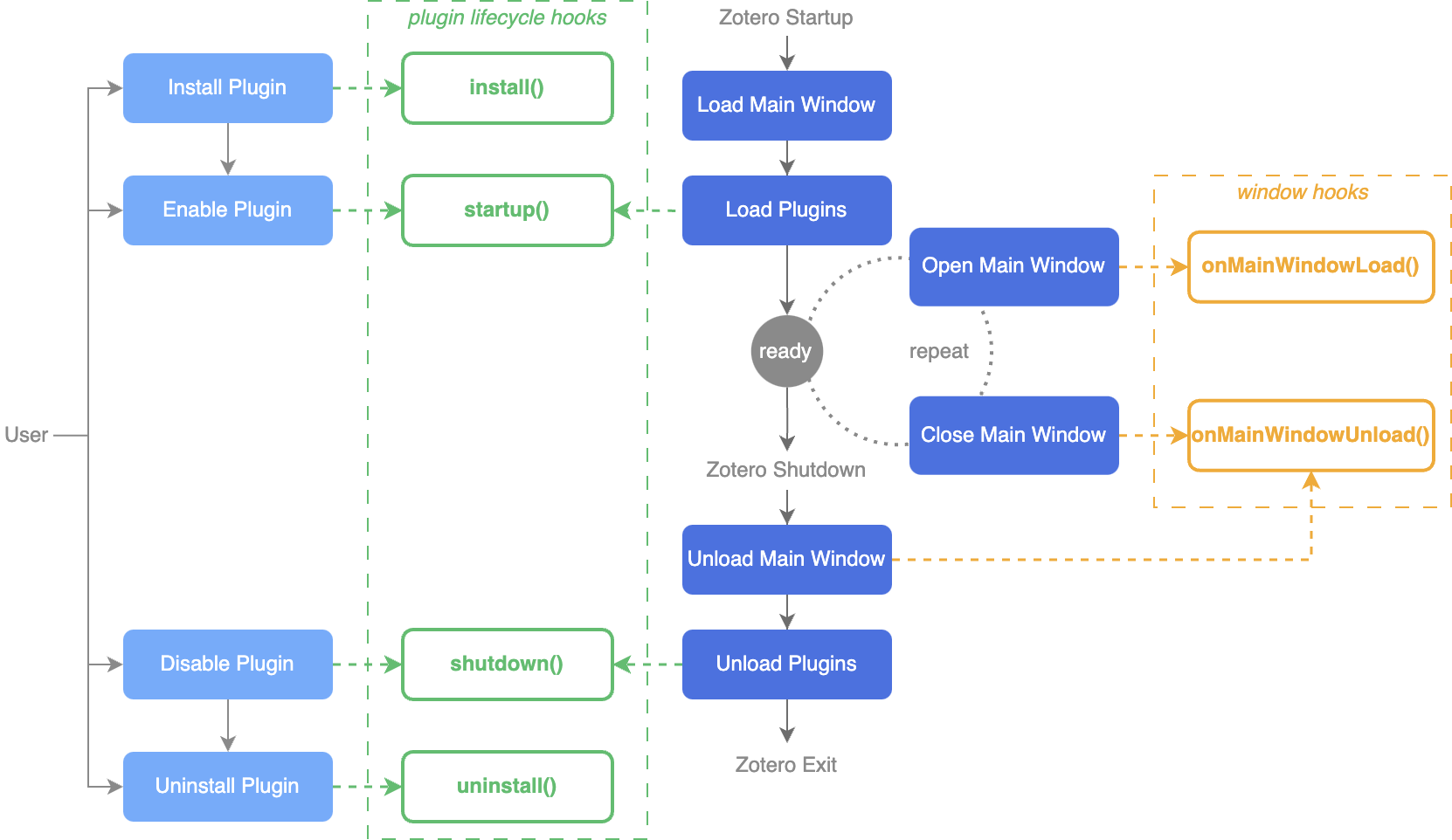
Every Zotero plugin follows a lifecycle from installation to uninstallation. The following table shows all available hooks and when they're triggered:
| Hook | Triggered when... | Description |
|---|---|---|
install |
The plugin is installed or updated | Set up initial configurations. This hook is only for setup tasks and the plugin isn't running yet. |
startup |
The plugin is being loaded | Initialize everything needed for the plugin to function. |
shutdown |
The plugin is being unloaded | Clean up resources before the plugin stops running. |
uninstall |
The plugin is being uninstalled or replaced by a newer installation | Perform cleanup for uninstallation. |
onMainWindowLoad |
The main Zotero window opens. Can happen multiple times during a session. | Initialize UI changes for the main window. |
onMainWindowUnload |
The main Zotero window closes. Can happen multiple times during a session. | Remove any window-specific changes. |
var MyPlugin;

function startup({ id, version, rootURI }, reason) {
    // Load main plugin code from external file
    // This keeps bootstrap.js clean and your plugin logic modular
    Services.scriptloader.loadSubScript(rootURI + 'my-plugin.js');

    // Initialize your plugin with the provided metadata
    MyPlugin.init({ id, version, rootURI });

    // Add UI to any windows that are already open
    // (Important: windows may already exist when plugin starts)
    MyPlugin.addToAllWindows();
}

function shutdown({ id, version, rootURI }, reason) {
    // Remove all plugin UI and clean up resources
    // This ensures clean disable/uninstall without restart
    MyPlugin.removeFromAllWindows();
    MyPlugin = undefined;
}

function install({ id, version, rootURI }, reason) {
    // Called once when plugin is first installed
}

function uninstall({ id, version, rootURI }, reason) {
    // Called when plugin is uninstalled
}
Parameters:
- Object with
id,version, androotURIproperties rootURI: string URL ending in/(e.g.,rootURI + 'style.css')reason: number matching constants:APP_STARTUP,APP_SHUTDOWN,ADDON_ENABLE,ADDON_DISABLE,ADDON_INSTALL,ADDON_UNINSTALL,ADDON_UPGRADE,ADDON_DOWNGRADE
Available in bootstrap scope:
Zoteroobject (automatically available in Zotero 7)Services,Cc,Ci, and other Mozilla objects
Best Practice: Keep bootstrap.js focused on lifecycle hooks only. Load your main plugin logic using Services.scriptloader.loadSubScript() as shown above.
Window hooks are called on opening and closing of the main Zotero window:
function onMainWindowLoad({ window }) {
    // Called every time a main window opens
    // Add your UI modifications here
    MyPlugin.addToWindow(window);
}

function onMainWindowUnload({ window }) {
    // Called when a main window closes
    // Remove references to window objects to prevent memory leaks
    MyPlugin.removeFromWindow(window);
}
Important: Main windows can be opened and closed multiple times during a session (especially on macOS). Always perform window-related activities in onMainWindowLoad() and clean up in onMainWindowUnload(). This is why we need both the lifecycle hooks (startup/shutdown) for plugin-wide setup and window hooks for per-window UI.
Note: Currently, only one main window is supported, but some users may find ways to open multiple main windows, and this will be officially supported in a future version.
Structure your main plugin code as a single object to encapsulate state and methods. This pattern keeps your code organized and makes it easy to clean up when the plugin is disabled.
MyPlugin = {
    id: null,
    version: null,
    rootURI: null,
    initialized: false,
    addedElementIDs: [],  // Track all DOM elements we add for easy cleanup

    init({ id, version, rootURI }) {
        // Prevent double-initialization if called multiple times
        if (this.initialized) return;
        this.id = id;
        this.version = version;
        this.rootURI = rootURI;
        this.initialized = true;
    },

    addToWindow(window) {
        let doc = window.document;

        // Add stylesheet
        let link = doc.createElement('link');
        link.id = 'my-plugin-stylesheet';  // Always assign IDs for cleanup
        link.type = 'text/css';
        link.rel = 'stylesheet';
        link.href = this.rootURI + 'style.css';
        doc.documentElement.appendChild(link);
        this.storeAddedElement(link);  // Track it for removal later

        // Load Fluent localization
        window.MozXULElement.insertFTLIfNeeded("my-plugin.ftl");

        // Add menu item
        let menuitem = doc.createXULElement('menuitem');
        menuitem.id = 'my-plugin-menuitem';
        menuitem.setAttribute('data-l10n-id', 'my-plugin-menu-label');
        menuitem.addEventListener('command', () => {
            this.handleMenuCommand();
        });
        doc.getElementById('menu_viewPopup').appendChild(menuitem);
        this.storeAddedElement(menuitem);
    },

    addToAllWindows() {
        // Get all currently open main windows
        var windows = Zotero.getMainWindows();
        for (let win of windows) {
            // Check if window is fully loaded with Zotero's main pane
            if (!win.ZoteroPane) continue;
            this.addToWindow(win);
        }
    },

    storeAddedElement(elem) {
        // Keep track of element IDs so we can remove them later
        // This is much more reliable than trying to remember what you added
        if (!elem.id) {
            throw new Error("Element must have an id");
        }
        this.addedElementIDs.push(elem.id);
    },

    removeFromWindow(window) {
        var doc = window.document;
        // Remove all tracked elements using their IDs
        for (let id of this.addedElementIDs) {
            doc.getElementById(id)?.remove();
        }
        // Remove Fluent localization
        doc.querySelector('[href="my-plugin.ftl"]')?.remove();
    },

    removeFromAllWindows() {
        var windows = Zotero.getMainWindows();
        for (let win of windows) {
            if (!win.ZoteroPane) continue;
            this.removeFromWindow(win);
        }
    },

    handleMenuCommand() {
        // Handle menu item click
    }
};
Key Practices:
- Use an initialization guard (
initializedflag) to prevent double-initialization - Track all added DOM elements with IDs in an array for easy cleanup
- Check for
win.ZoteroPaneexistence when iterating windows (ensures window is ready) - Create helper methods like
addToAllWindows()andremoveFromAllWindows() - Always assign IDs to elements you add to the DOM
- Use
?.remove()for safe removal (won't error if element doesn't exist)
Instead of manually installing the XPI after every change, load your plugin directly from source:
- Close Zotero
- Create a text file in the
extensionsdirectory of your Zotero profile directory named after your extension ID (e.g.,myplugin@mydomain.org) - The file contents should be the absolute path to your plugin source code directory (where
manifest.jsonis located) - Open
prefs.jsin the Zotero profile directory and delete lines containingextensions.lastAppBuildIdandextensions.lastAppVersion - Restart Zotero
After initial setup, start Zotero with the -purgecaches flag to force re-reading of cached files:
/path/to/zotero -purgecaches -ZoteroDebugText -jsconsoleProfile Management: When developing plugins, use a separate profile to protect your main library. See the multiple profiles guide.
Test code snippets quickly using the Run JavaScript window:
- Go to
Tools→Developer→Run JavaScript - Type your code in the left panel
- Click
Runto see results on the right
Example: Select an item, then run ZoteroPane.getSelectedItems()[0] to see the first selected item.
Use Zotero.debug() to log messages:
Zotero.debug("Hello, World!");View output at Help → Debug Output Logging → View Output.
Start Zotero with DevTools enabled:
/path/to/zotero -ZoteroDebugText -jsdebuggerThis opens Firefox 115 DevTools with the Browser Toolbox for inspecting DOM, setting breakpoints, and monitoring network requests.
Log to the console:
Zotero.getMainWindow().console.log("Hello, World!");Some functions require chrome:// content URLs (e.g., ChromeUtils.import() for JSMs/ESMs, .prop and .dtd locale files).
Register content and locale resources in startup():
var chromeHandle;

function startup({ id, version, rootURI }, reason) {
    var aomStartup = Cc["@mozilla.org/addons/addon-manager-startup;1"]
        .getService(Ci.amIAddonManagerStartup);
    var manifestURI = Services.io.newURI(rootURI + "manifest.json");
    chromeHandle = aomStartup.registerChrome(manifestURI, [
        ["content", "make-it-red", "chrome/content/"],
        ["locale", "make-it-red", "en-US", "chrome/locale/en-US/"],
        ["locale", "make-it-red", "fr", "chrome/locale/fr/"]
    ]);
}
Deregister in shutdown():
chromeHandle.destruct();
chromeHandle = null;Zotero 7 uses Fluent for localization, which replaces .dtd and .properties files. Fluent is more flexible and supports complex localization scenarios like plurals and gender.
Create a locale folder in your plugin root with subfolders for each locale:
locale/en-US/make-it-red.ftl
locale/fr-FR/make-it-red.ftl
locale/zh-CN/make-it-red.ftl
Any .ftl files in locale subfolders are automatically registered by Zotero.
Include Fluent files with a <link> element in your XHTML files:
<link rel="localization" href="make-it-red.ftl"/>For XUL documents with HTML namespace:
<html:link rel="localization" href="make-it-red.ftl"/>Or dynamically add to existing windows (most common for plugins):
// This loads your .ftl file into the window's localization system
window.MozXULElement.insertFTLIfNeeded("make-it-red.ftl");
Remove in shutdown() or when cleaning up a window:
doc.querySelector('[href="make-it-red.ftl"]')?.remove();Basic string substitution:
<tab data-l10n-id="make-it-red-tabs-advanced" />make-it-red-tabs-advanced =
.label = AdvancedWith arguments:
<tab data-l10n-id="make-it-red-intro-message"
data-l10n-args='{"name": "Stephanie"}'/>Use document.l10n for runtime string updates:
// Set localization ID on an element
document.l10n.setAttributes(element, "make-it-red-alternative-color");

// Set ID with arguments (for dynamic values)
document.l10n.setAttributes(element, "make-it-red-alternative-color", {
    color: 'Green'
});

// Update just the arguments (keeps same ID)
document.l10n.setArgs(element, { color: 'Green' });

// Get formatted string value without applying to DOM
// Useful for alerts, prompts, or logging
var msg = await document.l10n.formatValue('make-it-red-intro-message', { name });
alert(msg);Create a Localization object for strings outside window context (e.g., in background tasks):
// Create once per scope
var l10n = new Localization(["make-it-red.ftl"]);

var caption = await l10n.formatValue('make-it-red-prefs-color-caption');

// With arguments
var msg = await l10n.formatValue('make-it-red-welcome-message', {
    name: "Stephanie"
});
Note: This approach performs async I/O. While synchronous methods exist (formatValueSync() with new Localization(["file.ftl"], true)), they're strongly discouraged by Mozilla as they block the main thread.
Identifiers: Prefix all identifiers with your plugin name when adding to shared documents (e.g., make-it-red-prefs-shade-of-red).
Filenames: Either name files after your plugin or use subfolders:
locale/en-US/make-it-red/main.ftl
locale/en-US/make-it-red/preferences.ftl
Reference with subfolder: href="make-it-red/preferences.ftl"
Place default preferences in a prefs.js file in the plugin root:
pref("extensions.make-it-red.intensity", 100);These preferences are read when plugins are installed, enabled, or on startup.
Use the Zotero.Prefs object to interact with preferences:
// Get a preference value
const value = Zotero.Prefs.get("extensions.myplugin.mykey", true);

// Set a preference value
Zotero.Prefs.set("extensions.myplugin.mykey", "myvalue", true);

// Clear a preference
Zotero.Prefs.clear("extensions.myplugin.mykey", true);
The global parameter: When global is false or omitted, Zotero automatically prefixes keys with "extensions.zotero.". Set global to true for custom plugin keys:
// Without global=true, this looks for "extensions.zotero.zoterokey"
value = Zotero.Prefs.get("zoterokey");

// Equivalent to:
value = Zotero.Prefs.get("extensions.zotero.zoterokey", true);
Observing preference changes:
// Register observer
const observerID = Zotero.Prefs.registerObserver(
  "extensions.myplugin.mykey",
  (value) => {
    Zotero.debug(`Preference changed to ${value}`);
  },
  true
);

// Unregister observer
Zotero.Prefs.unregisterObserver(observerID);
Tip: For complex data, use JSON.stringify() and JSON.parse() to store and retrieve serialized values.
Register a preference pane in your plugin's startup() function:
Zotero.PreferencePanes.register({
    pluginID: 'make-it-red@zotero.org',
    src: 'prefs.xhtml',
    scripts: ['prefs.js'],
    stylesheets: ['prefs.css'],
});Create a XUL/XHTML fragment (no <!DOCTYPE>). Default namespace is XUL, HTML tags use html: prefix:
<linkset>
    <html:link rel="localization" href="make-it-red.ftl"/>
</linkset>

<vbox onload="MakeItRed_Preferences.init()">
    <groupbox>
        <label><html:h2>Colors</html:h2></label>
        <!-- content -->
    </groupbox>
</vbox>
Tips:
- Organize as
<groupbox>sequence for search optimization - All text in DOM is searchable by default
- Add manual keywords via
data-search-strings-rawattribute - Namespace all
class,id, anddata-l10n-idto avoid conflicts
Bind form fields directly to preference keys:
<html:input type="text" preference="extensions.zotero.makeItRed.color"/>Access preferences in code with Zotero.Prefs.get() directly.
Zotero's notification system allows plugins to respond when events occur, such as when items are added, modified, or removed. This uses an observer pattern where your plugin registers functions to listen for specific events.
const observerID = Zotero.Notifier.registerObserver(
  {
    notify: (event, type, ids, extraData) => {
      if (type === "item") {
        Zotero.debug(`Event ${event} on items: ${ids.join(", ")}`);
      }
    }
  },
  ["item", "collection"],  // Types to observe
  "my-plugin-observer"      // ID for debug output
);
Unregister when cleaning up:
Zotero.Notifier.unregisterObserver(observerID);Events: add, modify, delete, move, remove, refresh, redraw, trash, unreadCountUpdated, index, open, close, select
Types: collection, search, item, file, collection-item, item-tag, tag, setting, group, trash, relation, feed, feedItem, sync, api-key, tab, itemtree, itempane
Not all events are available for all types. Check the source code for specific combinations.
Register custom columns for the item tree:
const registeredDataKey = await Zotero.ItemTreeManager.registerColumn({
    dataKey: 'rtitle',
    label: 'Reversed Title',
    pluginID: 'make-it-red@zotero.org',
    dataProvider: (item, dataKey) => {
        return item.getField('title').split('').reverse().join('');
    },
});
Required fields: dataKey, label, pluginID
Unregister manually if needed:
await Zotero.ItemTreeManager.unregisterColumn(registeredDataKey);Columns are automatically removed when plugin is disabled/uninstalled.
Register custom sections in the redesigned item pane:
const registeredID = Zotero.ItemPaneManager.registerSection({
    paneID: "custom-section-example",
    pluginID: "example@example.com",
    header: {
        l10nID: "example-item-pane-header",
        icon: rootURI + "icons/16/universal/book.svg",
    },
    sidenav: {
        l10nID: "example-item-pane-header",
        icon: rootURI + "icons/20/universal/book.svg",
    },
    onRender: ({ body, item, editable, tabType }) => {
        body.textContent = JSON.stringify({
            id: item?.id,
            editable,
            tabType,
        });
    },
});
Required fields: paneID, pluginID, header, sidenav
Unregister manually:
Zotero.ItemPaneManager.unregisterSection(registeredID);Sections are automatically removed when plugin is disabled/uninstalled.
Register custom rows in the item pane's info section:
const registeredID = Zotero.ItemPaneManager.registerInfoRow({
    rowID: "custom-info-row-example",
    pluginID: "example@example.com",
    label: {
        l10nID: "general-print",
    },
    position: "afterCreators",
    multiline: false,
    nowrap: false,
    editable: true,
    onGetData({ rowID, item, tabType, editable }) {
        return item.getField("title").split("").reverse().join("");
    },
    onSetData({ rowID, item, tabType, editable, value }) {
        Zotero.debug(`Set custom info row ${rowID} of item ${item.id} to ${value}`);
    }
});
Unregister manually:
Zotero.ItemPaneManager.unregisterInfoRow(registeredID);Rows are automatically removed when plugin is disabled/uninstalled.
Register event handlers for the PDF reader.
Inject DOM events:
renderTextSelectionPopup: selection popup renderedrenderSidebarAnnotationHeader: sidebar annotation header renderedrenderToolbar: top toolbar rendered
Context menu events:
createColorContextMenu: color picker menucreateViewContextMenu: viewer right-click menucreateAnnotationContextMenu: sidebar annotation right-click menucreateThumbnailContextMenu: sidebar thumbnail right-click menucreateSelectorContextMenu: sidebar tag selector right-click menu
let type = "renderTextSelectionPopup";
let handler = event => {
    let { reader, doc, params, append } = event;
    let container = doc.createElement("div");
    container.append("Loading...");
    append(container);
    setTimeout(() => {
        container.replaceChildren("Translated text: " + params.annotation.text);
    }, 1000);
};
let pluginID = "make-it-red@zotero.org";
Zotero.Reader.registerEventListener(type, handler, pluginID);let type = "createAnnotationContextMenu";
let handler = event => {
let { reader, params, append } = event;
append({
label: "Test",
onCommand() {
reader._iframeWindow.alert("Selected annotations: " + params.ids.join(", "));
},
});
};
let pluginID = "make-it-red@zotero.org";
Zotero.Reader.registerEventListener(type, handler, pluginID);Unregister manually:
Zotero.Reader.unregisterEventListener(type, handler);Event handlers are automatically removed when plugin is disabled/uninstalled.
CRITICAL: If your plugin includes web-based UI components or artifacts, never use localStorage or sessionStorage. These browser storage APIs are not supported in Zotero's environment and will cause failures.
// ❌ NEVER use these
localStorage.setItem('key', 'value');
sessionStorage.setItem('key', 'value');

// ✅ Instead use React state or JavaScript variables
const [data, setData] = useState({});
// or
let pluginData = {};
For persistent data storage, use Zotero's preferences system or the Zotero API's data storage capabilities.
- Mozilla Fluent Syntax Guide
- Mozilla Fluent Tutorial
- Zotero Developer Forum
- Source Code Documentation
- Make It Red sample plugin for Zotero 7
Package your plugin as an XPI file (which is just a ZIP file with a .xpi extension):
cd your-plugin-directory
zip -r ../my-plugin.xpi *
The XPI should contain all your plugin files at the root level:
- manifest.json
- bootstrap.js
- prefs.js (if using default preferences)
- Other plugin files (scripts, stylesheets, locale files, etc.)
Important: When generating update_hash for your update manifest, use the SHA-256 hash:
shasum -a 256 my-plugin.xpi