Skip to content

Instantly share code, notes, and snippets.

@EllieJellyBean
Last active July 7, 2021 16:52
Show Gist options
  • Select an option

  • Save EllieJellyBean/c78ee83bf9787674d6725423403b7f62 to your computer and use it in GitHub Desktop.

Select an option

Save EllieJellyBean/c78ee83bf9787674d6725423403b7f62 to your computer and use it in GitHub Desktop.
Mod 4 Pre-Work

What does CORS stand for?

  • "Cross-Origin Resource Sharing" - a way to share restricted info from one domain to another domain

Why is it necessary?

  • It allows you to specify who can access your endpoint on the server side.

Why is this important for the Capstone?

  • I think this will be especially important if we create our own API for our capstone project - Security will continue to become more and more of a priority as the apps we develop get more complicated.

From Lesson:

CORS (Cross-Origin Resource Sharing) is an HTTP header that allows servers to indicate what other origins than it’s own have permission to load its resources. The origin is defined by the hostname (domain), scheme (protocol), and port of the URL used to access it.

CORS is actually a direct response to the Same-Origin Policy which is a security mechanism that restricts how a document/script loaded by one origin can interact with a resource from another origin. Although this is not as secure as authentication/authorization, you can think of it as an additional layer of security that helps prevent malicious attacks on your website. If you didn’t have the same origin policy in place, you could have facebook open in one tab and then go to another site and be able to access all of your private information. Same thing if you had a tab open with your bank info.

CORS is something you will need to enable in your capstone project so that the FE & BE can talk to each other. It is something the BE will need to incorporate so that the FE can talk with and access data from the BE server. There are various packages/gems out there in all languages including JS, Rails, and Python, that allow you to enable CORS by adding an “allow list” containing which domains may have access to your data. If you’re interested in reading up more in CORS, definitely check out the MDN docs!
Legacy Code Experience

ISSUE: #119

As a registered Paired user, When I login, And I click the user dropdown menu, And I click "View Stats," Then I see a section or sections about rock & pebble stats, such as:

How long the longest chain of rock & pebbles I belong to is (e.g., my rock has a rock, and I have a pebble, so this number is 4.)

How many pebbles I have had, both active and inactive (Copied from Rock & Pebble project board, was left on the dream pile)

GUIDED QUESTIONS

  1. Where will you start in the codebase, and why did you decide to start there?
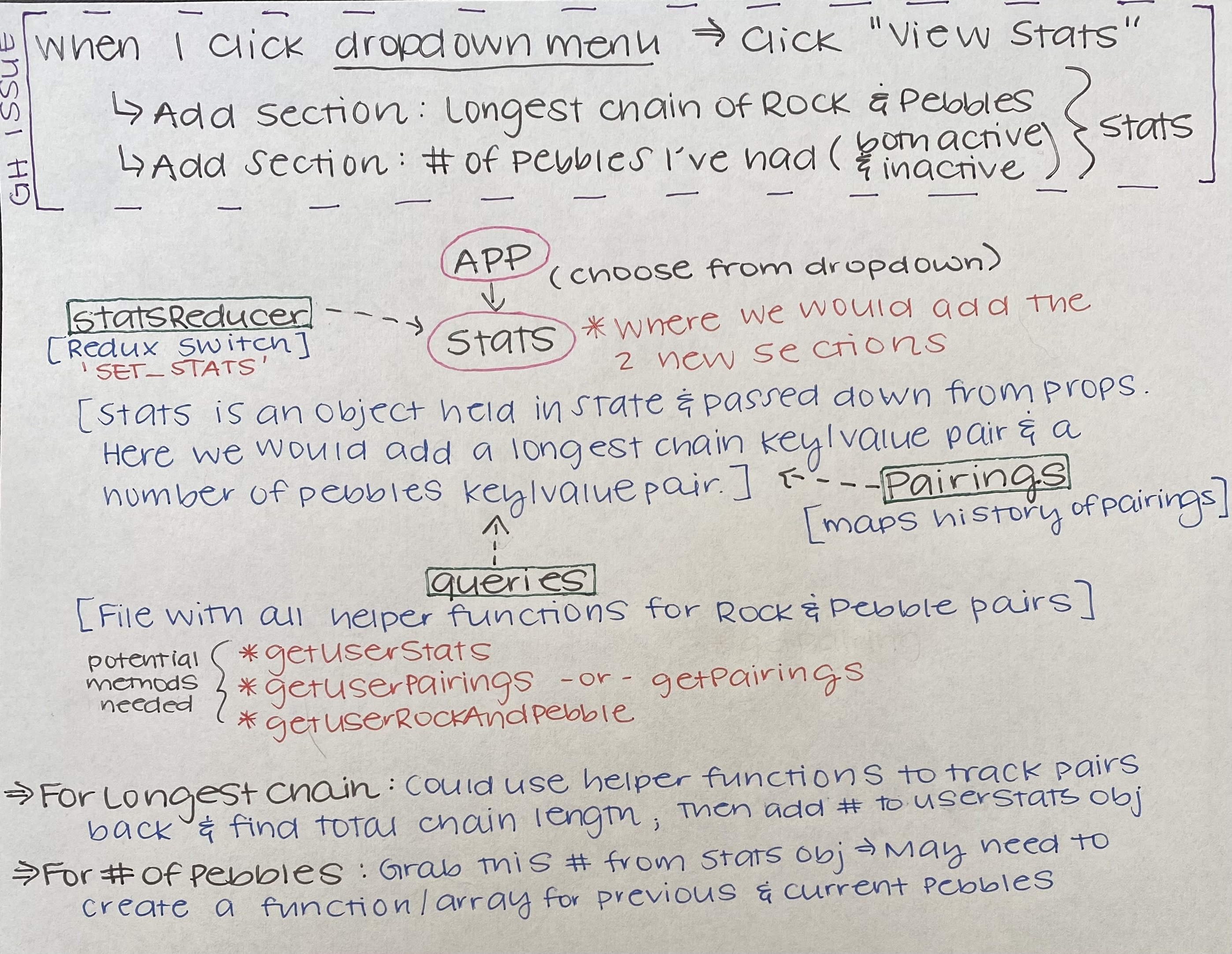
  • After reading through the README, I first looked through the components folder in src. Because the issue mentions the dropdown, I decided to first look through the Dropdown component (in the Components folder). I realized that this would just include the "View Stats" option, but it doesn't include any code that actually relates to the Rock & Pebble stats display/what would be rendered for this issue. So, I then decided to look in the RockandPebble component (in the Containers folder) and the Pairings component (in the Components folder) to see if I could figure out the general data flow of the components for anything relevant with the issue I chose.
  1. What is familiar to you about the codebase?
  • The React components and how they are separated into their own folders; React Router; PropTypes; Helper functions folder; Service Worker; utils folder for API calls; mock data file
  1. Are you making any assumptions? If so, what are they?
  • I assumed that the main App Component would be in the Components folder, so I got a little confused when I initially started looking for the data flow for my issue.
  1. How are you identifying what files are relevant to your issue?
  • I started with the Components and Containers folders looking for any components that were named anything potentially related to my issue. I first looked at Dropdown, RockCard, and PebbleCard. I then looked at the App component to understand the routes and the way the components communicated with each other. I also looked at the methods in actions, reducers, and utils folders to understand how and what stats are being stored.
  1. What is the data flow in the application? IMG_2666

  2. What is unfamiliar? (different file structures, new packages or gems, etc.)

  • Initially I saw Redux and Firebase, and I'm not familiar with either, but I also realized that I don't fully need to know about either to understand what I need to for this issue. Also, I haven't used async/await yet, so that's something I'm only somewhat familiar with.
  1. Is there technology that you would need to research?
  • I'm not sure that I would need to research Firebase, even though it is used in my chosen issue. I would need to look into Redux, especially reducers and the switch statement.
  1. Include the link to documentation for that technology
  1. Include at least one other source, such as an article/video you might use to gain an understanding of that technology (You do not need to read/watch).
  1. Include what search terms you used to find that source.
  • "Reducers in Redux"
  • "Switch in Redux"

Brief summary of what you researched

  • TensorFlow JS
  • Description: TensorFlow is a free and open-source software library for machine learning. It can be used across a range of tasks but has a particular focus on training and inference of deep neural networks. Tensorflow is a symbolic math library based on dataflow and differentiable programming.

How does it extend your current programming foundation?

  • Open source library to builds on top of JavaScript, which I already know. Python is the more common language used in ML, which a know a teeny tiny bit as well.

If you were asked in an interview about the topic you researched, what would you want to highlight?

Sign up for free to join this conversation on GitHub. Already have an account? Sign in to comment